




October 2025 marks another exciting chapter for Microsoft 365 Copilot. This isn’t just a minor update; it’s a significant leap forward in how AI-powered productivity tools can support you in your daily work. Copilot is at the heart of Microsoft 365, and these latest enhancements are designed to make your workflows smarter, faster, and more intuitive.
If you want to stay ahead of the curve, it’s important to understand what’s changing. This post will walk you through the key feature highlights from the October 2025 update, explain their impact on your business, and provide a simple checklist to help you prepare.
Official Link: What’s new in Microsoft 365 Copilot | October 2025
What’s New in October 2025: Feature Highlights
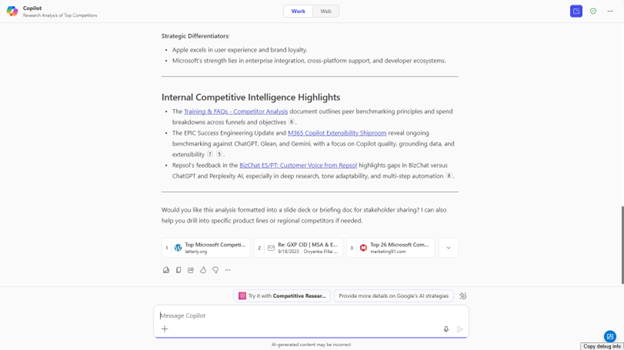
This month’s update introduces several game-changing features designed to boost AI productivity across Microsoft 365. Here are the most important ones:
- On-Canvas Slide Translation in PowerPoint: Translate your slides directly within your deck, saving time on localisation.
- “Hey Copilot” Voice Command: Interact with Copilot hands-free with the new voice wake command on Windows 11.
- Copilot Chat Upgrades: Benefit from a more powerful model, calendar search, and visual Bing web cards for richer context.
- New Microsoft 365 Premium Licensing: Copilot Pro features are now available to individuals through a simplified subscription.
- Agent Mode in Excel and Word: Let Copilot handle complex, multi-step tasks for you right inside your documents.
A Deeper Look at Each Feature
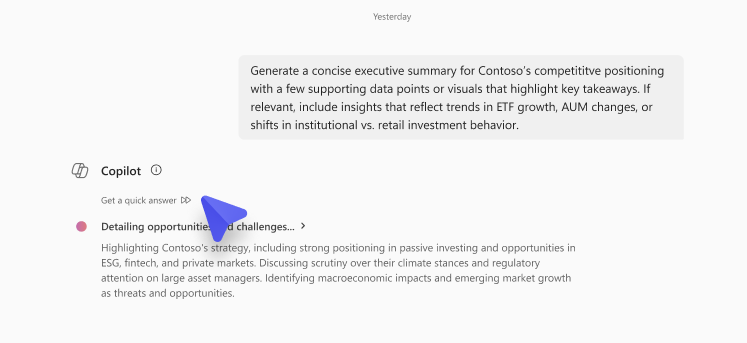
Let’s explore what these new Copilot features mean for you and your team.
On-Canvas Slide Translation in PowerPoint
Gone are the days of clunky, chat-based translations. Copilot now offers an on-canvas experience in PowerPoint, allowing you to translate content directly on your slides with just a few clicks. This is a massive time-saver for global teams needing to localise content quickly and efficiently. The feature is available across the web, Windows desktop, and Mac.
Voice Activation with “Hey Copilot”
For Windows 11 users, you can now activate your AI assistant by simply saying, “Hey Copilot.” This hands-free interaction transforms your workflow, allowing you to ask for help, generate content, or find information without breaking your stride. It’s a natural and seamless way to integrate AI into your daily routine.
Smarter Copilot Chat
Copilot Chat is getting a major intelligence boost. It will soon be powered by OpenAI’s new GPT-5 model, which uses a real-time router to select the best model for your prompt—whether you need a quick answer or deep analysis. You can also now search your Outlook calendar by meeting organiser or category, and Bing web cards deliver rich, visual summaries for web searches, making information easier to digest.
Last Month Updates: What’s new in Microsoft 365 Copilot | September 2025
New Licensing with Microsoft 365 Premium
Microsoft is making powerful AI more accessible with the launch of Microsoft 365 Premium. This new subscription plan includes Copilot Pro features, offering a straightforward upgrade path for individuals who want to take their productivity to the next level.
Agent Mode for Complex Tasks
Perhaps the most exciting update is Agent Mode, now available in Excel and Word. Think of it as giving Copilot a multi-step project. In Excel, it can build models or create charts for you. In Word, it can draft entire documents based on a simple prompt, like “summarise recent customer feedback and highlight key trends.” It’s like having a dedicated assistant to handle the heavy lifting while you stay in control.
Summary Table: October 2025 Copilot Updates
| Feature Category | Key Update | Impact / Benefit |
|---|---|---|
| Slide Translation | On-canvas PowerPoint translation | Faster localisation, global readiness |
| Voice & AI PC | “Hey Copilot” wake word | Hands-free productivity, improved workflow |
| Chat Enhancements | New model, calendar search, web cards | Smarter responses, richer context |
| Licensing | Microsoft 365 Premium launch | Simplified subscriptions, broader access |
| Agent Mode | AI workflows in Excel & Word | Agentic productivity, workflow automation |
Make These Updates Work for You
The October 2025 updates for Microsoft 365 Copilot are all about making your work life easier and more productive. By automating routine tasks and providing smarter assistance, Copilot frees you up to focus on what truly matters.
Ready to take advantage of these new features? Explore them in your Microsoft 365 apps, consider upgrading your plan if needed, and empower your teams with more intelligent workflows. The future of work is here, and it’s more collaborative than ever.
