



TL;DR: Microsoft 365 Copilot June 2026 marks a turning point — Copilot Cowork is now generally available, new AI model options are live, and app-level updates across Word, Excel, Outlook, and PowerPoint make everyday work noticeably faster. Admins also gain stronger governance tools to manage rollouts with confidence.
June 2026 is a big month for Microsoft 365 Copilot. Not in a vague, “things are getting better” kind of way. In a concrete, here’s-what-changed-and-why-it-matters kind of way.
The headline update is Copilot Cowork reaching general availability. That alone shifts what Copilot is capable of. But there’s more — new model options, meaningful app updates across Word, Excel, Outlook, and PowerPoint, expanded access to Copilot Notebooks, and a stronger set of admin controls for governance and cost management.
I’ve been through the full June 2026 release notes so you don’t have to. Here’s what’s actually worth your attention.
Why These Microsoft 365 Copilot Updates Matter
Most Copilot updates until now have been incremental. Better drafts. Smarter suggestions. Useful, but not quite a shift in how work gets done.
June 2026 feels different.
The move toward agentic workflows — where Copilot doesn’t just suggest but actually executes — changes the value proposition for teams. Marketing, sales, IT, and operations all have clear reasons to pay attention this month.
For admins, the new governance and cost management features are overdue. Rolling out AI tools across an enterprise without proper controls is a risk. Microsoft has addressed that directly here.
Top Microsoft 365 Copilot Updates in June 2026
Copilot Cowork Is Now Generally Available
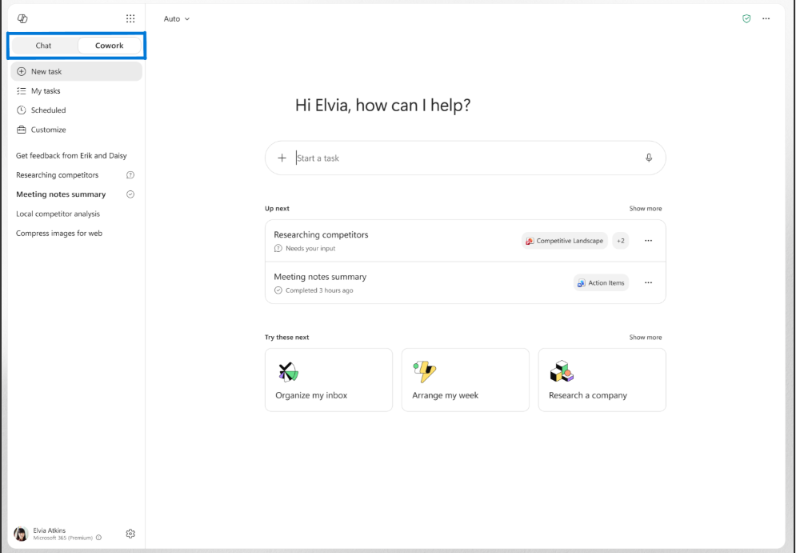
Copilot Cowork is now live worldwide, enabled via usage-based billing.
Here’s the key distinction. Regular Copilot gives you a draft or a recommendation. You still do the work. Cowork plans a task, executes it, and delivers a finished result. You toggle between “Chat” (for answers) and “Cowork” (for action) right inside the Microsoft 365 Copilot app.
It’s powered by Work IQ, which grounds tasks in your existing business systems — not a generic AI response.
A practical example: a finance team needs to process expense reports weekly. With Cowork, that task runs through browser automation via Edge, navigating your intranet and business systems automatically. The team gets a completed output, not a starting point.
Teams can also build custom skills — reusable instructions for recurring tasks — so you’re not rewriting prompts every time.
New Model Options in Copilot
Copilot now supports multiple AI models, including OpenAI GPT 5.5 Thinking and Anthropic models (Opus and Sonnet).
Cowork selects the best model automatically depending on the task. GPT 5.5 Thinking handles deep research with citations. Anthropic models are used for visual and design-heavy work like PowerPoint decks and graphics.
In Word, you can choose your model manually — which matters if you want tighter control over tone, structure, or how detailed the output is.
This flexibility is genuinely useful. Different tasks have different requirements, and one model doesn’t fit all.
Copilot Updates in Word, Excel, Outlook, and PowerPoint
Word now supports Anthropic models for editing, giving writers more flexibility when rewriting or restructuring content. A new “Copilot Catchup” card surfaces changes since you last opened a document. You can also prompt Copilot to apply edits directly from comment feedback — so reviewers leave notes, and Copilot action them across the whole document.
Excel gets three notable additions: Skills (to package repeatable workflows), Personalisation (to save your formatting and formula preferences), and .Rules sheets (to set workbook-specific standards). An analyst working on a shared financial template can now ensure every team member using Copilot follows the same conventions automatically.
Outlook now lets you refine drafts directly inside the compose canvas. Highlight one paragraph, ask Copilot to make it more concise, and the rest of the email stays untouched. Classic Outlook for Windows also gives you direct access to Copilot settings from one place.
PowerPoint introduces a Brand Kit Picker — select admin-approved templates from the start, complete with your organisation’s fonts, colours, and logos. You can also reference SharePoint libraries and OneDrive folders to ground your slides in real content. Sales teams building proposals will feel this one immediately.
Copilot Notebooks and Research Workflows
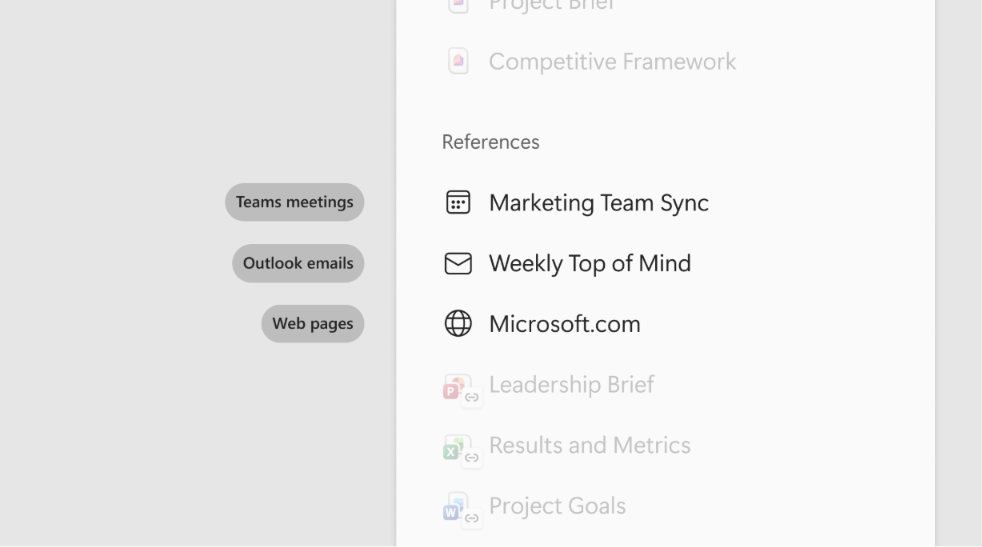
Copilot Notebooks are now rolling out to Copilot Chat users, not just those with full licences. That’s a meaningful expansion.
Notebooks give you a shared space to collect research — meetings, web pages, and now Outlook emails — and turn it into something structured. Mind maps. Study guides. Summaries grounded in actual project context.
For content teams, this is especially useful. You can gather sources, emails, and reference documents in one place, then use Copilot to build a draft or outline. Analysts running recurring reports can store source material and apply consistent structure each cycle.
It’s not a flashy feature. But for anyone who does research-heavy work, it removes a lot of the organising overhead that usually happens in a separate tool.
Admin, Security, and Governance Updates
This is the section IT teams have been waiting for.
Microsoft Purview Data Loss Prevention (DLP) now lets admins restrict Copilot from referencing, summarising, or grounding responses in external emails. That’s an important control — especially for regulated industries where email data needs to stay contained.
Purview controls also extend to Cowork. Sensitivity label inheritance, audit logging, eDiscovery, Data Lifecycle Management, and Communication Compliance are all supported. If Cowork is executing tasks autonomously, you need this paper trail. Now you have it.
The new Cost Management Dashboard in the Microsoft 365 admin centre lets admins allocate Copilot Credits, set spending limits by group, and choose between prepaid or pay-as-you-go billing. You can track Cowork credit usage at a granular level — which matters when usage-based billing is involved.
Admins also get a dedicated toggle for the Vision feature (screen and camera sharing inputs), plus the ability to publish organisation prompts in the Prompt Gallery.
Business Use Cases Worth Exploring
Marketing teams can use Cowork to run end-to-end content workflows — from brief to first draft — without manually prompting at each stage. Notebooks support campaign research and source tracking.
Sales teams benefit most from the PowerPoint Brand Kit Picker and SharePoint folder referencing. Proposal generation gets faster and stays on-brand automatically.
IT teams now have real governance infrastructure. Purview DLP, audit logging, the Cost Management Dashboard, and Vision controls mean you can roll out Copilot features confidently rather than reactively.
Operations teams can use Cowork’s custom skills and browser automation to standardise recurring tasks — expense reports, status updates, data entry workflows — without manual oversight.
What This Means for Copilot Adoption
Don’t try to roll everything out at once.
Pick one department with a clear, repeatable workflow. Run Cowork there first. Measure how much time it saves, where it breaks down, and what governance gaps appear. Then expand.
Before activating usage-based features like Cowork, configure your Cost Management Dashboard and set group spending limits. Set up Purview DLP policies to control what data Copilot can reference. These aren’t optional steps — they’re the foundation for a responsible rollout.
The teams that will get the most from these updates are the ones that treat adoption as a process, not a switch to flip.
Key Takeaways
- Copilot Cowork is now generally available — and it’s the most significant shift in how Copilot works, moving from assistant to executor.
- New model options (GPT 5.5 Thinking, Anthropic) give you more control over quality, speed, and task fit.
- Word, Excel, Outlook, and PowerPoint all received updates that reduce manual steps in everyday workflows.
- Copilot Notebooks are now accessible to more users, making research workflows easier to manage.
- Admins have stronger tools than ever for governance, compliance, and cost management.
Start with one use case. Govern it properly. Then scale.
Frequently Asked Questions
What is the biggest Microsoft 365 Copilot update in June 2026?
The general availability of Copilot Cowork is the most significant update. Copilot Cowork is an agentic system that plans, executes, and delivers completed work — not just drafts or recommendations. It’s available worldwide via usage-based billing and represents a clear shift in what Microsoft 365 Copilot can do.
How is Copilot Cowork different from regular Copilot?
Regular Copilot (Chat mode) gives you answers, drafts, and suggestions. You still complete the work. Copilot Cowork (Action mode) takes a defined task and executes it from start to finish, returning a completed deliverable. Teams can also build custom skills in Cowork to standardise recurring tasks without rewriting prompts each time.
Is Microsoft Scout available to all users?
Microsoft Scout was listed as a planned update in the June 2026 roadmap, but specific availability details were not confirmed in the official release notes at time of writing. Check the Microsoft 365 admin centre or the Microsoft 365 roadmap for the latest rollout status.
Which Microsoft 365 apps got the most useful updates in June 2026?
Word, Excel, and PowerPoint received the most substantial updates. Word gains model choice and comment-based editing. Excel introduces custom skills, personalisation, and workbook rules sheets. PowerPoint adds the Brand Kit Picker and SharePoint folder referencing. Outlook’s compose canvas refinement is smaller in scope but highly practical for daily email work.
What should businesses do before rolling out these new Copilot features?
Three steps before you activate anything. First, configure the Cost Management Dashboard in the Microsoft 365 admin centre and set group-level spending limits — especially for Cowork, which runs on usage-based billing. Second, set up Purview DLP policies to control whether Copilot can reference external emails. Third, define clear guidelines for which teams will pilot which features, and track adoption and productivity from day one.
