



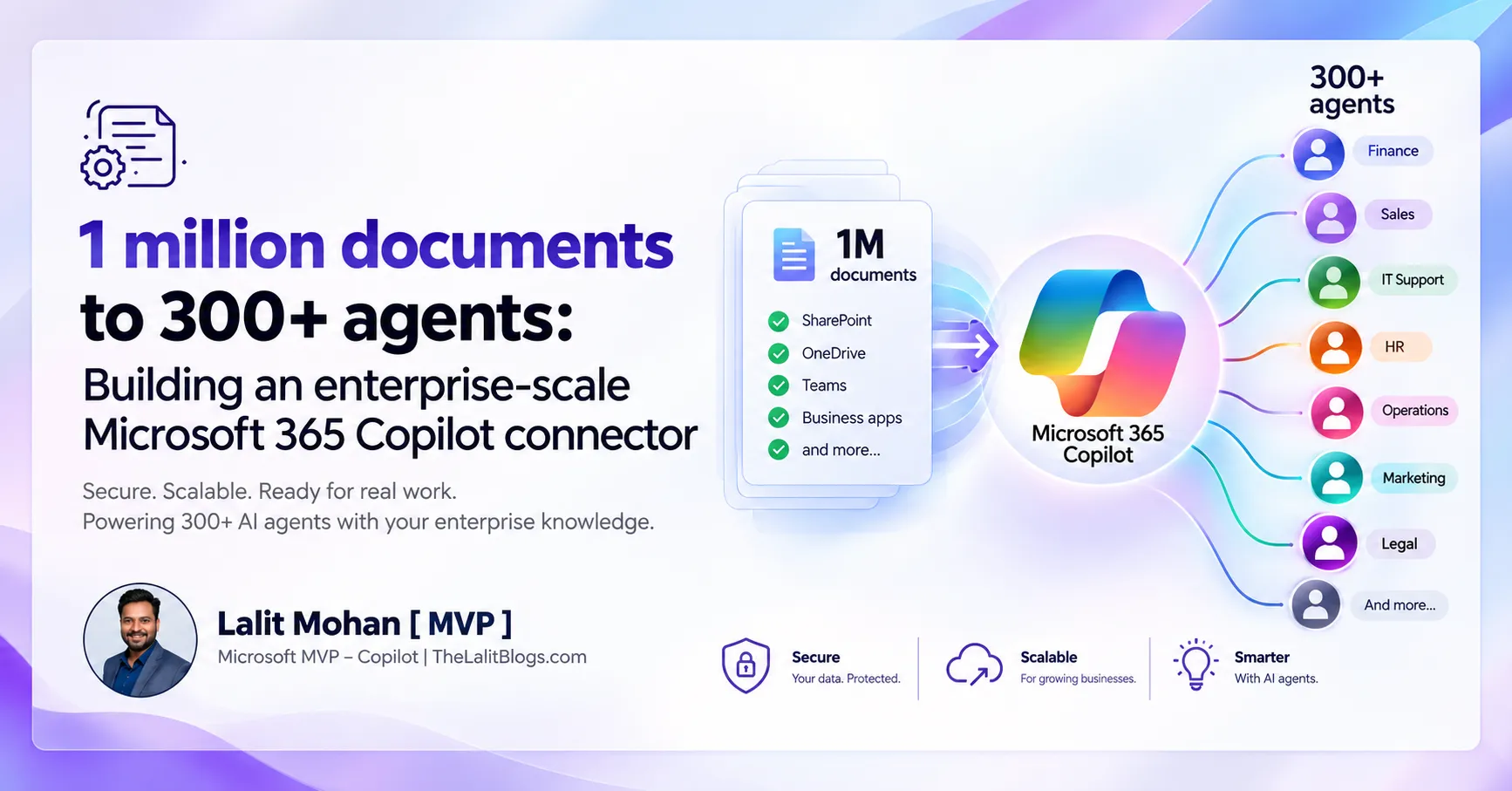
TL;DR: Microsoft built an enterprise-scale Microsoft 365 Copilot connector serving over 1 million documents, 100,000+ monthly users, and 300+ Copilot Studio agents. The architecture relies on incremental change detection, metadata enrichment, permissions-aware indexing, and the Microsoft Graph connectors API — and it offers a clear blueprint for any organization serious about enterprise AI at scale.
Let’s be honest — most organizations don’t have a data problem. They have a data access problem.
The documents exist. The knowledge is there. It’s buried across file repositories, business applications, content portals, and internal systems that your AI has no idea how to reach. Your employees search. They switch tabs. They copy and paste. They rebuild context from scratch every single time they need an answer.
That’s the real challenge Microsoft tackled in its July 2026 enterprise-scale Copilot connector case study. Not storage. Not compute. The hard part was making over 1 million documents discoverable, searchable, fresh, secure, and genuinely useful — across 100,000+ monthly users and more than 300 Copilot Studio agents.
The case study is a blueprint. And if your organization is planning to scale Microsoft 365 Copilot beyond a handful of pilots, the architecture behind it matters more than almost anything else.
Here’s what it looks like, why it works, and what you need to build it right.
Official Link: 1 million documents to 300+agents
What Is a Microsoft 365 Copilot Connector?
Microsoft 365 Copilot Connectors Explained
A Microsoft 365 Copilot connector is a data integration component that brings information from external or organizational data sources into experiences that Microsoft 365 Copilot can use. Think of it as the bridge between your enterprise knowledge and your AI layer. Without it, Copilot only sees what lives inside Microsoft 365 natively — your emails, Teams messages, SharePoint files, and calendar data.
With a connector, Copilot can reach further. It can surface knowledge from your custom content systems, internal portals, document repositories, and business applications — indexed, secured, and made available through the Microsoft Graph and the Semantic Index.
Why Connectors Matter for Enterprise AI
Without the right data connections, your employees are stuck doing the same thing they’ve always done:
- Searching across multiple disconnected systems
- Opening portals and navigating folder structures manually
- Copying information between applications
- Rebuilding context for every AI interaction they attempt
A well-designed connector removes that friction. It makes relevant organizational knowledge available directly within the Microsoft ecosystem — so Copilot can actually help, rather than shrug.
How AI-Powered Knowledge Retrieval Differs From Traditional Search
Traditional enterprise search works like this: find a document → open it → read it yourself.
AI-powered knowledge retrieval works differently. You ask a question. The system retrieves the most relevant information. Copilot generates an answer — or supports an agent workflow — without you needing to open a single file.
That shift sounds small. At enterprise scale, across hundreds of agents and thousands of daily users, it compounds into something significant.
The Scale Challenge: 1 Million Documents and 300+ Agents
This is where the case study gets serious.
Microsoft’s July 2026 article documents an enterprise-scale Copilot connector implementation built to the following specs:
| Metric | Scale |
|---|---|
| Documents | 1M+ |
| Monthly users | 100K+ |
| Copilot Studio agents | 300+ |
| Architecture | Enterprise-scale Microsoft 365 Copilot connector |
Each of those numbers tells a different story about what the architecture has to handle.
What 1 Million Documents Actually Means
Ingesting a million documents is the easy part. Keeping them useful is where the real work starts.
An enterprise connector working at that scale has to manage:
- Metadata — what each document is, who owns it, what it’s about
- Indexing — how it’s stored and surfaced through the Semantic Index
- Updates — tracking what changed and when
- Permissions — who can see what
- Relevance — ensuring the right documents surface for the right queries
- Freshness — keeping information current as documents are edited or deleted
- Duplication — avoiding redundant content that dilutes AI answer quality
Miss any of these, and your million documents become a liability instead of an asset.
What 100,000+ Monthly Users Demands From Your Architecture
At this query volume, performance consistency isn’t optional. Your connector architecture has to support sustained load without degradation — every user expecting the same quality of AI response, regardless of how many others are using the system simultaneously.
That means your ingestion pipeline, your indexing layer, and your retrieval configuration all need to be designed for scale from day one. Not retrofitted when the system starts to slow down.
Why 300+ Agents Changes Everything
Three hundred Copilot Studio agents isn’t just a large number — it’s a governance challenge.
Each agent needs to:
- Access shared organizational knowledge reliably
- Respect agent-specific context and instructions
- Operate within its own permission boundary
- Stay current as the underlying data changes
- Be discoverable and manageable at the organizational level
When you have that many agents drawing from the same knowledge layer, the architecture underneath has to hold. Weak foundations don’t survive that kind of load.
The Architecture Behind an Enterprise-Scale Copilot Connector
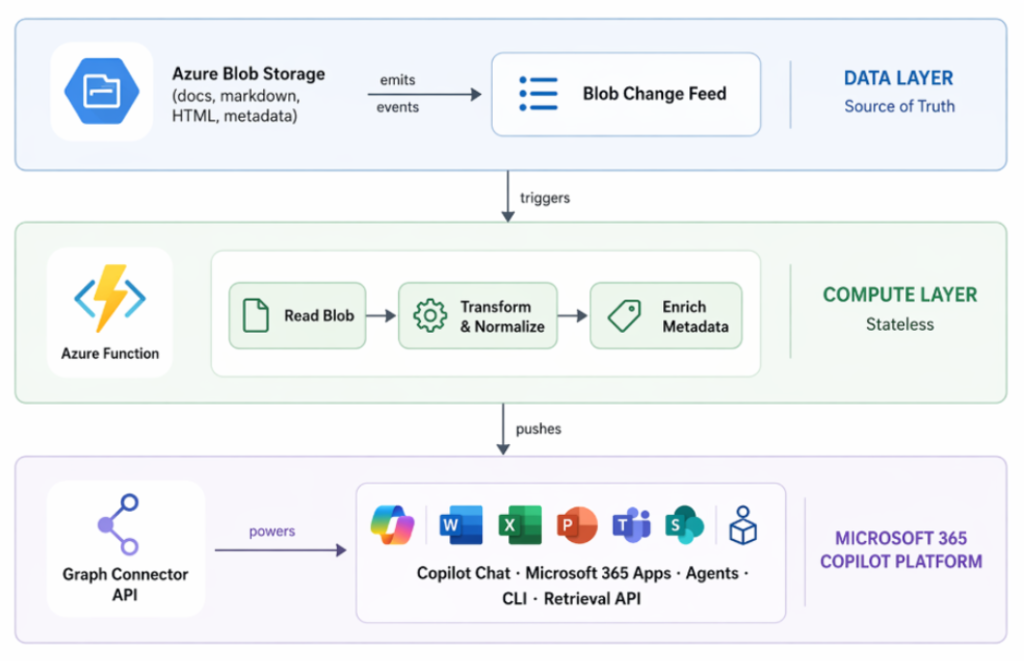
Here’s a simplified view of how the pipeline flows:
Enterprise Data Sources
        ↓
   Data Ingestion
        ↓
Change Detection / Processing
        ↓
  Enrichment + Metadata
        ↓
Microsoft 365 Copilot Connector
        ↓
   Enterprise Knowledge
        ↓
Copilot Search + Copilot Studio Agents
Microsoft’s own implementation uses Azure Blob Storage, Blob Change Feed, Azure Functions, processing and enrichment stages, and the Microsoft Graph connectors API. Each layer has a specific job. Together, they form a system that can keep 1 million documents fresh, secure, and accessible to hundreds of agents.
Where Enterprise Documents Come From
Documents don’t live in one place. They originate from:
- File repositories and storage systems
- Internal knowledge bases and wikis
- Business applications and portals
- Content management platforms
- Custom-built information systems
Your connector architecture needs to reach all of them — without requiring employees to change where they work.
Why Change Detection Is the Right Approach
Here’s the problem with reprocessing everything from scratch: it doesn’t scale.
At 1 million documents, a full refresh is expensive. It’s slow. And it’s unnecessary. The majority of your content hasn’t changed since the last ingestion cycle. Processing it again wastes compute, delays freshness, and adds operational cost.
Change detection flips the approach. The system watches for what’s new, modified, or deleted — and only processes those items. Microsoft’s architecture uses Azure Blob Change Feed to do exactly this. Small, targeted updates instead of full rebuilds. That’s what makes the pipeline efficient at enterprise scale.
Processing and Enrichment
Raw documents aren’t ready to be indexed. They need to be:
- Processed — parsed, cleaned, and structured
- Enriched — tagged with metadata that improves retrieval
- Normalized — formatted consistently across different source systems
- Permission-mapped — associated with the access controls that determine who can see them
This stage is where much of the intelligence in the architecture lives. The richer the metadata, the better Copilot can filter, rank, and retrieve the right information for the right query.
The Role of the Microsoft Graph Connectors API
The Microsoft Graph connectors API is the layer that makes external organizational content available to Microsoft 365 experiences — including Copilot, Microsoft Search, and Copilot Studio agents. It’s the interface between your ingestion pipeline and the Semantic Index that Copilot draws from when answering questions or supporting agent workflows.
This API isn’t the only way to build an enterprise connector, but it’s the documented, supported path within the Microsoft ecosystem — and the one at the core of the case study architecture.
Why Incremental Updates Matter at Enterprise Scale
The difference between full reprocessing and incremental processing is the difference between a system that works and one that eventually breaks under its own weight.
Full refresh approach:
1 million documents → process everything → update everything → repeat
Incremental processing approach:
1 million documents → detect changed items → process only those → update relevant records
That gap grows dramatically as your content volume increases. Incremental processing gives you:
- Performance — shorter processing windows, lower peak load
- Freshness — updates reach the index faster
- Efficiency — far less compute per cycle
- Scalability — the approach remains viable at 2x, 5x, 10x data volume
- Lower operational cost — you pay for what changed, not everything
Microsoft’s change-feed architecture makes this possible by design. If you’re building an enterprise connector and you’re not building around incremental updates, you’ll feel the cost of that decision eventually.
Keeping Copilot Knowledge Fresh
Enterprise data doesn’t sit still. Every day, documents are:
- Created and published
- Edited and revised
- Deleted or archived
- Renamed or reorganized
- Reclassified under new security policies
- Moved between systems or owners
- Permissioned differently as teams change
The Freshness Problem
Stale knowledge produces stale answers. If your connector reflects yesterday’s data, Copilot may cite an outdated policy, reference a document that no longer exists, or miss something critical that was published this morning.
For enterprise AI, stale data is just as dangerous as missing data. The answer sounds confident. It’s just wrong.
Event-Driven Updates
Event-driven architectures — where changes trigger updates as they happen — keep the knowledge layer close to real-time. Instead of waiting for a scheduled batch job, the system responds to document events directly. Microsoft’s Azure Blob Change Feed approach captures these events at the storage layer and feeds them into the processing pipeline without manual intervention.
Why Freshness Matters More for AI Than for Search
Traditional search can tolerate some staleness. Users expect results to lag a little. They know to check the date.
AI agents don’t offer that cue. They answer confidently. That’s what makes freshness a functional requirement for enterprise Copilot — not a nice-to-have.
Security and Permissions Are Critical
This isn’t optional. It’s the section every CIO and IT leader should read twice.
Enterprise AI cannot simply expose every document to every employee. A connector architecture that ignores this creates risk at the exact point where employees trust AI answers the most.
Your connector design has to account for:
- Identity — who is asking the question
- Access permissions — what that person is allowed to see
- Security trimming — filtering results to match the user’s access level
- Sensitive information — documents that require additional classification controls
- Data ownership — who is responsible for what content
- Compliance — regulatory and policy obligations
- Governance — how you audit and control what Copilot can surface
The Golden Rule of Enterprise Copilot Security
Copilot should never give a user access to information they couldn’t access through the underlying system directly.
If someone can’t open the file in SharePoint, they shouldn’t be able to get its contents through an AI response. The Microsoft Graph permission model enforces this — Copilot respects access controls at the user level. But that only works if the connector is built with permissions mapped correctly from the start.
Permissions bolted on after the fact create gaps. Build them in from day one.
How 300+ Copilot Studio Agents Change the Architecture
Three hundred agents drawing from the same knowledge layer means that layer is no longer just an IT asset. It’s a shared enterprise capability — and it needs to be designed and governed as one.
Shared Enterprise Knowledge
Multiple agents will need access to the same organizational information. Policies. Products. Procedures. Customer-facing content. When that knowledge lives in one well-structured, well-governed connector, every agent benefits. When it’s scattered, every agent suffers.
Agent-Specific Context
Shared knowledge doesn’t mean identical behavior. Different agents need:
- Different data sources for their specific workflows
- Different instructions that shape how they use shared knowledge
- Different tools and integrations
- Different business rules and escalation paths
The architecture has to support both — a common knowledge foundation with the flexibility for agents to apply it differently based on their purpose.
Avoiding Knowledge Silos
Here’s what happens when every department builds its own isolated knowledge store:
- Duplicate content spreads across the organization
- Conflicting information surfaces in agent responses
- Maintenance burden multiplies with every new agent
- Discoverability collapses
- Governance becomes nearly impossible
A shared connector architecture solves this. One place to govern. One place to update. Many places to benefit.
Microsoft 365 Copilot Connector vs. Building a Separate AI Knowledge System
Not every organization needs a custom connector. But every organization should understand the tradeoffs.
| Approach | Enterprise Challenge |
|---|---|
| Separate AI knowledge system | Additional infrastructure to build and maintain |
| Individual agent knowledge bases | Content duplication and governance fragmentation |
| Manual document uploads | Poor scalability, unreliable freshness |
| Central connector architecture | Shared enterprise knowledge layer with consistent governance |
The right choice depends on your data architecture, security requirements, existing Microsoft ecosystem, and how many agents you’re planning to support. If you’re heading toward dozens or hundreds of agents, a central connector strategy is worth serious consideration.
The Biggest Lessons From Microsoft’s Enterprise Copilot Connector
Lesson 1: Design for Scale From the Beginning
A connector that works for 10,000 documents will not automatically work for 1 million. The architectural decisions you make early — indexing strategy, change detection, metadata schema, permission mapping — determine whether your system scales gracefully or breaks under pressure.
Lesson 2: Build Around Changes, Not Full Reprocessing
Incremental processing becomes increasingly critical as data volume grows. Build your pipeline to detect and process what changed — not to rebuild everything from scratch on a schedule.
Lesson 3: Treat Metadata as Important as Content
AI retrieval doesn’t depend solely on document body text. Metadata — department, owner, content type, date, security classification — improves filtering, relevance ranking, governance, and retrieval quality. Define your metadata schema before you start indexing.
Lesson 4: Make Security Part of the Architecture
Permissions aren’t a feature you add later. They’re a structural requirement. Design your permission mapping before the first document is indexed.
Lesson 5: Think Beyond One Copilot Use Case
A well-designed knowledge layer can support multiple Copilot experiences simultaneously — Copilot Chat, Microsoft Search, Copilot Studio agents, and future experiences you haven’t planned yet. Build once. Benefit many times.
Lesson 6: Monitor the System Continuously
Track:
- Connector health and ingestion status
- Data freshness across content types
- Failed items and indexing errors
- Search quality and retrieval relevance
- Usage patterns and agent performance
If you can’t see what’s happening inside your connector, you can’t improve it.
Common Mistakes When Building Enterprise Copilot Connectors
Mistake 1: Connecting Everything Without Governance
More data doesn’t automatically produce better AI. Unstructured, poorly governed data produces noisy, unreliable AI. Start with high-value content, not all content.
Mistake 2: Ignoring Document Quality
Duplicate content, outdated policies, and poorly written documents degrade the quality of every answer Copilot generates from them. The AI is only as good as what you feed it.
Mistake 3: Using Full Reprocessing at Scale
You’ll pay for this in performance and operational cost. It’s avoidable.
Mistake 4: Ignoring Permissions
This is the highest-risk mistake on the list. Misconfigured permissions create data exposure through the AI layer — at exactly the point where employees trust the answers they receive.
Mistake 5: Building Agents Before Fixing Knowledge
If the underlying data is poor, adding more agents spreads the problem further. Fix the knowledge layer first. Agents built on strong foundations perform consistently. Agents built on weak ones generate unpredictable results.
Mistake 6: Not Measuring Retrieval Quality
Are users getting accurate, relevant answers? Is Copilot surfacing the right documents for the right queries? These questions require measurement — not assumption.
How to Build an Enterprise-Ready Microsoft 365 Copilot Connector
Here’s the practical roadmap.
Step 1: Map Your Data
Identify every relevant data source, document type, content owner, permission structure, and update frequency. You can’t connect what you haven’t mapped.
Step 2: Prioritize High-Value Content
Don’t connect everything on day one. Start with the information employees actually need — high-traffic knowledge, frequently asked questions, core policies, and business-critical documents.
Step 3: Define Your Metadata Schema
Establish consistent metadata across all content. At minimum: department, content type, owner, date, business function, and security classification.
Step 4: Design Incremental Ingestion
Use change detection wherever your source systems support it. Avoid batch-based full reprocessing as a default strategy.
Step 5: Implement Permission Controls
Map access controls from source systems to your connector before indexing any content. Validate that security trimming works correctly before going live.
Step 6: Connect to Microsoft 365 Copilot
Use the appropriate Microsoft connector architecture for your data sources — either Microsoft-built connectors available through the admin center, or custom connectors built via the Microsoft Graph connectors API.
Step 7: Build Copilot Studio Agents
Start with high-value business workflows — not every possible use case. Agents that do one thing well outperform agents that do many things poorly.
Step 8: Test Retrieval Quality
Test for accuracy, relevance, freshness, correct permission trimming, and failure handling. Run tests under different user profiles and security contexts.
Step 9: Monitor and Improve
Create an ongoing optimization cycle. Connector health, data freshness, retrieval quality, and agent performance all need continuous attention.
How Enterprise Copilot Connectors Improve AI Agent ROI
A strong connector architecture means your agents spend less time struggling to find information and more time doing useful work.
Potential organizational benefits include:
- Faster knowledge discovery — employees get answers without switching systems
- Reduced information searching — less time lost to manual lookups
- Better employee productivity — AI assistance that actually reflects organizational reality
- More capable agents — agents grounded in real, current enterprise knowledge
- Reduced duplication — one shared knowledge layer instead of many isolated stores
- Improved AI adoption — employees trust AI that gives accurate, consistent answers
That said — measure your own results. The ROI of enterprise AI depends on your specific workflows, data quality, and how well the connector architecture is implemented. Don’t rely on general estimates when your actual usage data will tell you more.
What This Means for CIOs and IT Leaders
For CIOs
The connector architecture isn’t a technical detail — it’s a strategic asset. Your data architecture determines what your AI can do. Before asking “how many agents should we build,” ask “does our data architecture support the agents we want to build?”
For IT Leaders
Focus on integration depth, scalability, monitoring, and security. The connector pipeline touches all four. Change detection, permission mapping, and connector health monitoring are operational priorities, not optional configuration.
For Business Leaders
Better data architecture means faster access to organizational knowledge. It means AI agents that give consistent, accurate answers. It means employees spending less time searching and more time doing.
Is Your Organization Ready for Enterprise-Scale Copilot?
Here’s a quick readiness check. Ask your team:
- Do we know where our enterprise knowledge lives?
- Is our data properly classified and governed?
- Are permissions accurate across our key content systems?
- Can we identify frequently changing content?
- Do we have a connector strategy — not just individual pilots?
- Do we have Copilot governance policies in place?
- Are our AI agents drawing from reliable, current enterprise data?
- Can we measure Copilot adoption and agent performance?
- Do we have an AI operating model that includes data stewardship?
If several answers are “No,” that’s your starting point. Address the data and governance foundation before scaling to hundreds of agents. More agents on top of a weak knowledge layer don’t solve the problem — they amplify it.
Frequently Asked Questions
What is a Microsoft 365 Copilot connector?
A Microsoft 365 Copilot connector is a data integration component that ingests content from external or organizational data sources — such as file repositories, business applications, and internal portals — into the Microsoft Graph Semantic Index, making that content accessible to Microsoft 365 Copilot and related AI experiences.
How does Microsoft 365 Copilot access enterprise data?
Microsoft 365 Copilot accesses enterprise data through a combination of native Microsoft 365 content (SharePoint, Teams, Exchange), the Microsoft Graph Semantic Index, and external data indexed via Microsoft 365 Copilot connectors. User-level permissions govern what each person can see in AI responses — Copilot respects existing access controls and does not surface content a user couldn’t access directly.
Can Microsoft 365 Copilot handle millions of documents?
Enterprise-scale connector architectures can support very large knowledge environments. Microsoft’s own case study documents a connector serving over 1 million documents and 300+ Copilot Studio agents. Achieving this scale requires deliberate architecture decisions around incremental ingestion, metadata management, permissions mapping, and connector monitoring.
What are Microsoft Graph connectors?
Microsoft Graph connectors allow external organizational content to be indexed into Microsoft Search and the Semantic Index, making that content available to Microsoft 365 Copilot, Microsoft Search, and other Microsoft 365 experiences. Connectors can be built using the Microsoft Graph connectors API or deployed using pre-built connectors available through the Microsoft 365 admin center.
What is Copilot Studio?
Copilot Studio is Microsoft’s platform for creating, configuring, and managing custom AI agents within the Microsoft 365 ecosystem. Organizations use Copilot Studio to build agents that perform specific business workflows — drawing on enterprise knowledge sources, Microsoft Graph data, and external API integrations.
How do Copilot connectors improve AI agents?
Copilot connectors ground agents in real organizational knowledge. Instead of relying on generic AI training data or manually uploaded documents, agents can access current, permission-aware enterprise content indexed through the connector. This improves answer accuracy, contextual relevance, and overall agent usefulness across business workflows.
How do you keep Copilot connector data up to date?
Keeping connector data current requires a change detection or event-driven update approach — where the system identifies and processes only new or modified content, rather than reprocessing everything on a schedule. Microsoft’s architecture uses Azure Blob Change Feed for this purpose. The goal is freshness without the operational cost of full reprocessing at scale.
Are Copilot connectors secure?
Security in Copilot connectors depends on correct configuration — not on the connector technology itself. Connectors must map permissions from source systems accurately, enforce user-level security trimming, and comply with organizational governance policies. Microsoft Purview plays a central role in AI governance, including content classification, output monitoring, and compliance enforcement across connector-connected knowledge.
How many Copilot Studio agents can an enterprise build?
Microsoft’s case study documents an implementation supporting 300+ agents. The practical limit depends less on platform constraints and more on your organization’s ability to govern, maintain, and monitor agents at scale. More agents require a stronger shared knowledge layer, clearer governance policies, and more rigorous operational monitoring.
Key Takeaways
- Enterprise AI is only as effective as the enterprise knowledge architecture behind it.
- Microsoft’s July 2026 case study documents a connector serving 1M+ documents and 300+ Copilot Studio agents with 100K+ monthly users.
- Incremental data processing — not full reprocessing — is the right approach as content volume grows.
- Data freshness directly determines AI usefulness; stale data produces stale, potentially misleading answers.
- Permissions and security must be built into the connector architecture from the start, not added afterward.
- A shared knowledge layer can support hundreds of AI agents and multiple Copilot experiences simultaneously.
- Scaling Microsoft 365 Copilot successfully requires equal attention to data quality, architecture, governance, and agent design.
The Question Isn’t How Many Agents You Can Build
Building more AI agents is easy. Building agents that actually work — consistently, securely, at scale — is not.
Microsoft’s case study makes the infrastructure challenge clear. A million documents. A hundred thousand users. Three hundred agents. That doesn’t happen by deploying Copilot and uploading a few files. It happens through deliberate architecture — change detection, metadata enrichment, permission mapping, incremental ingestion, and continuous monitoring.
For your organization, the right starting question isn’t “how many agents can we build?”
It’s “can our data architecture support the agents we want to build?”
Answer that honestly. Then build from there.
