



Quick answer: Microsoft’s August 2026 Copilot update brings improvements across Microsoft 365, including Cowork, Copilot Chat, Word, PowerPoint, Excel, Outlook, SharePoint, OneDrive, Planner, and Teams. The update focuses on three themes: more control over AI, more connected business data, and moving from AI answers to real work. Some features are generally available, while others are in Public Preview or Frontier, so check your tenant before assuming access.
Microsoft has released a big set of updates to Copilot in August 2026. This isn’t just one small change. It’s a wide update that touches almost every app in Microsoft 365.
You’ll find new features in Copilot Chat, Cowork, Copilot Notebooks, Teams, Word, PowerPoint, Excel, SharePoint, Outlook, OneDrive, Planner, and even in IT admin tools. Microsoft has also added new connectors that bring outside business data into Copilot.
Three big themes stand out this month. First, users get more control over how AI works and how much it costs. Second, Copilot gets better access to real business data, like Power BI reports and SharePoint files. Third, Copilot is moving from just answering questions to actually doing tasks for you.
One important note: not every feature is available to everyone right away. Microsoft rolls out features in stages, such as Public Preview, Frontier, and worldwide availability. Check your own tenant settings before assuming a feature is ready to use. Microsoft’s own roadmap says dates can change.
official Update: What’s New in Microsoft Copilot | August 2026
Quick Overview: What’s New in Microsoft Copilot in August 2026?
| Copilot Area | Major August 2026 Updates |
|---|---|
| Cowork | Effort controls, cost visibility, Automations |
| Copilot Chat | Text selection, chat sharing, Power BI reasoning, answer cards, Try again |
| Copilot Notebooks | Copilot + OneNote experience, artifact recommendations |
| Teams | Change language of meeting recaps |
| Word | Hyperlinks, image understanding, edit highlights |
| PowerPoint | Brand controls, custom skills, comments, translation |
| Excel | Chat history and change history |
| SharePoint | Personal skills |
| Outlook | Custom agents and natural-language actions |
| OneDrive | Improved file-to-output workflow |
| Planner | Status reports and task capabilities |
| Connectors | New industry-specific integrations |
| IT Admin | Data export and GitHub Copilot AI Credits |
Microsoft Copilot Cowork Gets New Effort and Cost Controls
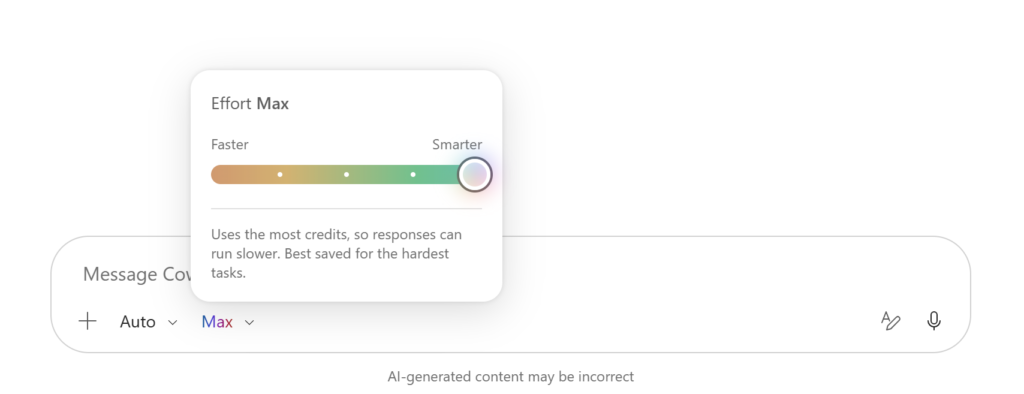
Choose How Much Effort Copilot Uses
Cowork now lets you pick an effort level: Light, Medium, High, Extra High, or Max. Higher effort means deeper reasoning, but it also takes longer and uses more credits. Microsoft says Medium works best for everyday tasks. Save the higher levels for complex work.
Better Visibility Into Cowork Credit Usage
A new /cost skill shows how many credits you’ve used this session, what percent of your monthly limit is left, your total usage so far this month, and when your limit resets.
Scheduled Tasks Become Automations
Microsoft renamed the Scheduled tab to Automations. This brings both scheduled tasks and event-triggered tasks into one place, making them easier to manage.
Business impact: These changes help teams balance AI quality, speed, and cost in one view.
Microsoft Copilot Chat Gets Major Productivity Improvements
Select Specific Text and Ask Copilot to Work on It
You can now highlight a sentence, paragraph, or table and ask Copilot Chat to work on just that piece. For example, “summarize this paragraph” or “explain this table.”
Share an Entire Chat or Individual Response
Copilot Chat now lets you share a full chat or a single response. Others can view it and reuse the work, which makes team collaboration easier.
Copilot Can Reason Over Power BI Data
Copilot Chat can now reason over Power BI reports and semantic models you have access to. Ask a question in plain language and get an answer grounded in your real business data.
New Model-Driven Answer Cards
Copilot Chat now shows rich answer cards for topics like weather, sports, finance, images, video, places, and news.
Try Again With the Same or Different Model
If an answer isn’t quite right, click “Try again” to regenerate it using the same model or a different one, without restarting your conversation.
Create an Email From Copilot Chat on Mobile
On mobile, you can turn an idea into a full email: start in Copilot Chat, generate a draft, send it to Outlook, edit it, and hit send.
Copilot Notebooks Get New Ways to Work
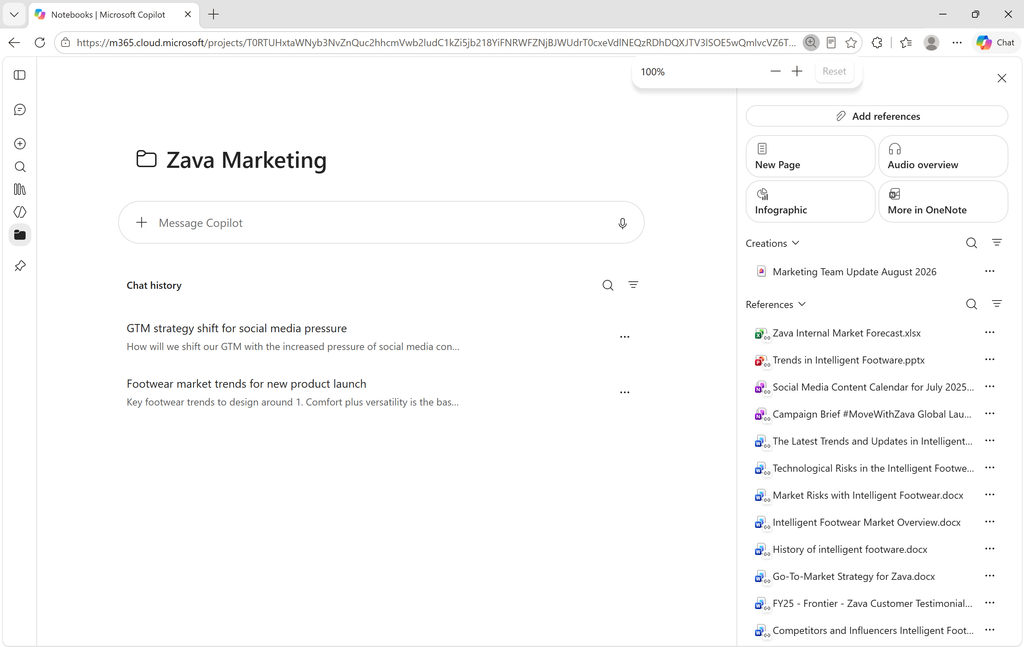
Copilot Notebooks now connect the Copilot app and OneNote. Use the Copilot app for quick conversations and reference checks, or use OneNote for deeper project work and collaboration. Notebooks stay synced between both.
Copilot Notebooks can also recommend artifacts, like a Word document, Excel workbook, or PowerPoint deck, based on your notebook content and current project.
A multimodal capture feature, supporting audio, images, and structured notes, is rolling out in September on Android and iOS/iPad, so it’s not part of the August release.
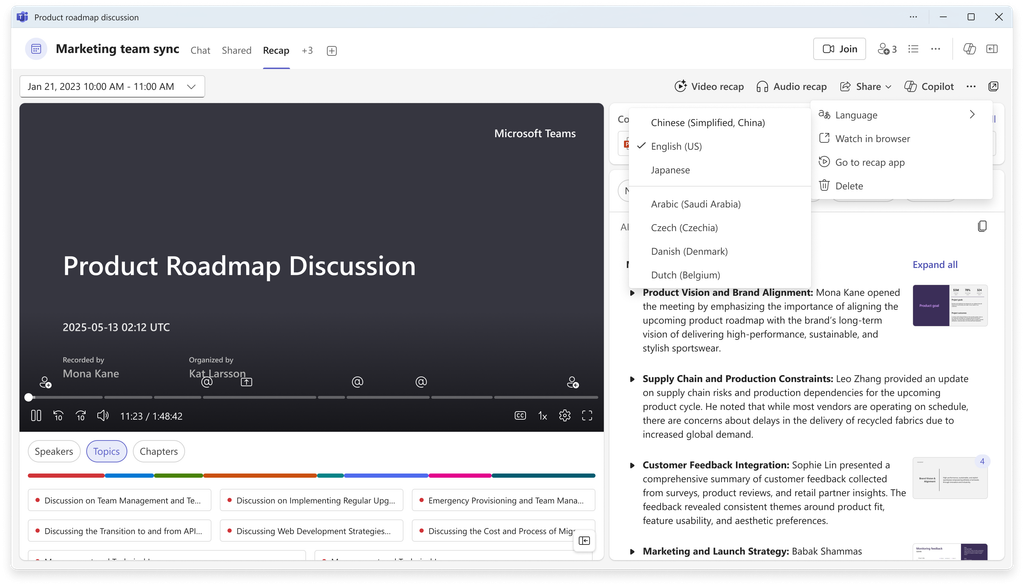
Copilot in Teams Can Change Meeting Recap Languages
You can now translate an existing meeting recap into another language with one click. This helps global teams and multilingual organizations share meeting information more easily across borders.
New Copilot Features in Microsoft Word
Copilot can now add and format hyperlinks directly in your document. It can also understand images inside reference documents, not just text, when creating new content.
Editing is clearer too. Instead of highlighting a whole paragraph, Copilot now highlights only the specific words it changed. This makes reviewing edits faster and more transparent.
Microsoft PowerPoint Gets Smarter Copilot Controls
PowerPoint’s update goes beyond content generation.
- Comments: Copilot can help assign tasks and notify stakeholders directly from comments.
- Strict brand adherence: Copilot can be restricted to approved templates, slide layouts, and placeholders — useful for regulated industries and customer-facing content.
- Note steering: Instructions placed in slide notes can guide how Copilot builds a presentation from a template.
- Custom skills: Users can upload, create, edit, and delete their own reusable skills, cutting down on repetitive prompting.
- Faster translation: Translation now happens inside Copilot, with text boxes resizing automatically.
- SmartArt editing: Copilot can edit SmartArt while keeping brand consistency. This is currently Frontier-only, not generally available.
Copilot in Excel Adds Better History and Workbook Understanding
A new change history skill helps you see recent workbook changes, who made them, and whether they came from a human or AI. You can even restore formulas or return a workbook to an earlier working state.
Copilot chat history is also available directly inside Excel, so you can revisit past conversations. Together, these features add traceability and continuity to AI-assisted spreadsheet work.
Copilot in SharePoint Introduces Personal Skills
Users can now create personal skills that work across SharePoint sites and OneDrive. Each skill is stored as a Markdown file in your OneDrive. This entered Public Preview in August 2026, with worldwide rollout planned for December.
This matters because it turns one-time prompting into reusable instructions, useful for standard content reviews, repeatable research, and consistent document processing. Not every skill is automatically available to every user or tenant.
Copilot in Outlook Gets Agents and More Natural-Language Actions
Outlook now supports custom engine agents. You can also manage your inbox using natural language — organizing messages, applying categories, creating folders, and setting rules — plus manage calendar events and meetings the same way.
Copilot is moving from helping you read email to helping you act on it.
Copilot in OneDrive Moves From Finding Files to Creating Work
A new Public Preview capability lets Copilot in OneDrive find the right content, analyze files and data, and create finished outputs like summaries, dashboards, or presentations. You can then save and share the results. Worldwide rollout is planned for December.
This shifts OneDrive from simple file storage into a full workflow: files, analysis, output, and collaboration.
Copilot in Planner Helps Turn Plan Data Into Status Reports
The Planner Agent can generate stakeholder-ready status reports covering progress, risks, overall status, and next steps. You can customize the audience, tone, length, and sections.
Copilot support for creating and querying Planner tasks is scheduled for September, separate from this August release.
Microsoft Expands the Copilot Ecosystem With New Connectors
New connectors bring specialized business data into Copilot:
- Financial services: Mercury, Xero
- Legal services: iManage Work, Boardwise, Harvey, Descrybe Legal Engine, Relativity, Everlaw
- Professional and business services: Statista, Crossbeam, ZoomInfo, IDC
- Energy and resources: S&P Global Energy
- Healthcare and life sciences: Scite, Consensus
- Software and technology: Adobe Journey Optimizer, GoDaddy, Asana
Connecting Copilot to specialized data makes it more useful for industry-specific work.
New IT Admin Capabilities in Microsoft Copilot
Admins can now export de-identified, row-level data from Copilot and Agent 365 dashboards for deeper analysis of adoption and usage, without exposing personal identifiers.
The Consumption Dashboard now supports GitHub Copilot AI Credits, helping admins compare usage against budgets and decide where to adjust investment.
The Bigger Picture: Microsoft Copilot Is Becoming an AI Work Layer
These updates aren’t random. They point to five clear trends:
- Copilot is becoming more action-oriented. The pattern is Ask → Understand → Create → Act, seen in Outlook actions, Planner tasks, PowerPoint assignments, and OneDrive outputs.
- AI is becoming more grounded in business data, through Power BI, SharePoint, OneDrive, Excel, and new connectors.
- Reusable AI instructions are becoming more important, as seen in SharePoint personal skills and PowerPoint custom skills.
- Governance is becoming a bigger part of Copilot, through brand adherence, note steering, data export, and usage analytics.
- AI cost management is becoming routine, shown by Cowork’s effort controls and credit visibility.
What IT Administrators Should Prepare For
- Review feature availability. Sort features into generally available, Public Preview, Frontier, and upcoming.
- Evaluate usage and adoption. Track active users, consumption, and business outcomes by department.
- Prepare governance policies for data access, AI-generated content, custom skills, agents, connectors, and brand controls.
- Identify high-value use cases first, such as document creation, meeting summaries, email management, reporting, and data analysis.
August 2026 Microsoft Copilot Updates — Complete Summary
| Product | August 2026 Update | Availability |
|---|---|---|
| Cowork | Effort controls, /cost, Automations | August |
| Copilot Chat | Text selection, sharing, Power BI, answer cards, Try again | August |
| Copilot Notebooks | Copilot + OneNote experiences | August |
| Teams | Meeting recap language change | August |
| Word | Hyperlinks, image understanding, edit highlights | August |
| PowerPoint | Brand controls, skills, comments, translation | August |
| Excel | Change history and chat history | August |
| SharePoint | Personal skills | Public Preview |
| Outlook | Custom engine agents and natural-language actions | August |
| OneDrive | Improved file capabilities | Public Preview |
| Planner | Status reports | Frontier |
| Planner | Task creation/querying | September |
| Connectors | New industry integrations | August |
| Admin | Data export | September |
| GitHub Copilot | AI Credits dashboard support | July |
Not every row above is generally available worldwide. Always check Microsoft’s rollout labels for your tenant.
Frequently Asked Questions About Microsoft Copilot August 2026
What is new in Microsoft Copilot in August 2026?
Microsoft added new features across Cowork, Copilot Chat, Word, PowerPoint, Excel, Outlook, SharePoint, OneDrive, Planner, Teams, and Copilot Notebooks, plus new connectors and IT admin tools.
What are the biggest Microsoft 365 Copilot updates in August 2026?
The biggest updates are Cowork’s effort and cost controls, Copilot Chat’s Power BI reasoning and text selection, and PowerPoint’s brand governance features.
What is new in Copilot Chat?
Copilot Chat now supports text selection, chat and response sharing, Power BI reasoning, richer answer cards, a “Try again” option, and mobile email creation.
What is new in Microsoft Copilot Cowork?
Cowork added effort-level controls (Light to Max), a /cost skill for credit visibility, and an Automations tab that combines scheduled and event-triggered tasks.
What are Copilot Notebooks?
Copilot Notebooks connect the Copilot app and OneNote so you can move between quick conversations and deeper project work, with AI-recommended artifacts based on your content.
What is new in Copilot in Word?
Word’s Copilot can now add hyperlinks, understand images in reference documents, and highlight the exact words it changes during editing.
What is new in Copilot in PowerPoint?
PowerPoint’s Copilot adds comment-based task assignment, strict brand adherence, note steering, custom skills, faster translation, and Frontier-only SmartArt editing.
What is new in Copilot in Excel?
Excel’s Copilot now offers a change history skill and access to past Copilot chat conversations directly inside the workbook.
What is new in Copilot in Outlook?
Outlook now supports custom engine agents and natural-language management of email and calendar actions.
What is new in Copilot in SharePoint?
SharePoint introduced personal skills, stored as Markdown files in OneDrive, usable across SharePoint sites. This is in Public Preview as of August 2026.
What is new in Copilot in OneDrive?
OneDrive’s Copilot can now find content, analyze files, create finished outputs like summaries and dashboards, and let you save and share results. This is in Public Preview.
What is new in Copilot in Planner?
The Planner Agent can generate customizable status reports covering progress, risks, and next steps. Task creation and querying features are planned for September.
Are the August 2026 Copilot features available to everyone?
No. Some features are generally available in August, while others are in Public Preview or Frontier, with wider rollout planned later, such as December for SharePoint personal skills and OneDrive features.
Which Microsoft Copilot features are in Public Preview?
SharePoint personal skills and the new OneDrive file-to-output workflow are both in Public Preview as of August 2026.
What should IT administrators know about the August 2026 Copilot updates?
Admins should review feature availability by tenant, monitor adoption and credit usage, prepare governance policies for agents and connectors, and identify high-value use cases to roll out first.
Microsoft Copilot August 2026: From AI Assistant to AI Work Platform
The August 2026 update shows where Copilot is headed. It’s no longer just a tool that answers questions. It’s becoming a layer that connects business data, AI reasoning, content creation, workflow, and action, all in one place.
Before rolling out these features, organizations should weigh availability, security, governance, cost, and user adoption alongside the potential business value. Copilot’s direction is clear: less time spent asking questions, more time spent getting work done.
