



Let’s be honest—most of us spend a lot of time doing repetitive tasks every day: replying to emails, updating documents, creating reports, or making slides. It takes time and energy. That’s where Microsoft Copilot can truly help.
Microsoft Copilot is an AI assistant built into Microsoft 365. It works alongside you in Word, Excel, PowerPoint, Outlook, and Teams. You use simple, everyday language to ask for what you need—and it handles the rest.
Whether you’re a manager, analyst, remote worker, or IT administrator, Copilot helps you save time, work smarter, and focus on what actually matters.
In this guide, we’ll walk through what Microsoft Copilot does, how it works, and why so many professionals are starting to rely on it every day.
What is Microsoft Copilot?
Microsoft Copilot is an AI assistant built into Microsoft 365. It combines natural language understanding with Microsoft Graph to access your emails, files, calendar, chats, and meetings.
You don’t need technical skills to use it. Just type what you need in plain English. Copilot understands your request and gets to work.
It’s designed for workplace productivity. That means it respects permissions, keeps your data secure, and works only with information you already have access to.
Core Microsoft Copilot Features
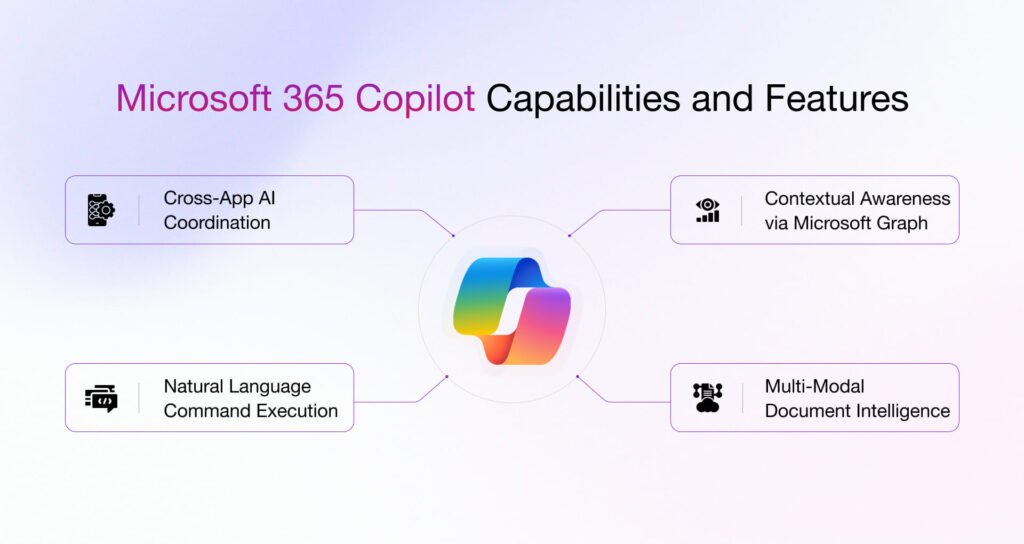
Here’s what Copilot can do across your everyday Microsoft apps:
1. Smart Content Creation (Word)
Copilot in Word helps you write faster and better.
Features:
- Draft documents instantly from a simple prompt
- Rewrite sections for clarity or tone
- Summarise long reports in seconds
- Generate structured outlines for new projects
Benefits:
✔ Saves writing time
✔ Improves clarity
✔ Reduces manual editing
Example: You need to write a monthly report. Instead of starting from scratch, you ask Copilot to create a draft based on notes from Teams and data from Excel. It’s done in minutes.
2. Advanced Data Analysis (Excel)
Copilot in Excel makes working with data much easier.
Features:
- Analyse large datasets without complex formulas
- Suggest formulas automatically
- Create charts and visualisations in seconds
- Generate insights in plain English
Benefits:
✔ Faster decision-making
✔ No need for advanced Excel skills
✔ Better data visualisation
Example: You want to know which products sold best last quarter. Just ask Copilot. It filters the data, highlights top performers, and creates a chart—no formulas required.
3. Intelligent Email Assistance (Outlook)
Copilot in Outlook helps you manage your inbox faster.
Features:
- Draft professional emails in seconds
- Summarise long email threads
- Suggest quick replies based on context
Benefits:
✔ Reduces inbox time
✔ Improves communication quality
✔ Keeps you on top of priorities
Example: You’ve got a long email thread with 15 replies. Copilot summarises the key points, highlights unanswered questions, and suggests a response. You’re caught up in seconds.
4. AI Meeting Summaries (Teams)
Copilot in Teams makes meetings more productive.
Features:
- Automatic meeting recaps
- Action items clearly listed
- Speaker summaries
- Key highlights from discussions
Benefits:
✔ No manual note-taking
✔ Better team alignment
✔ Saves hours every week
Example: You missed a meeting. Copilot gives you a summary, lists the decisions made, and shows who’s responsible for follow-ups. You’re back in the loop instantly.
5. Presentation Automation (PowerPoint)
Copilot in PowerPoint speeds up slide creation.
Features:
- Create slides from documents or prompts
- Generate speaker notes automatically
- Improve slide design and layout
Benefits:
✔ Faster presentations
✔ Professional formatting
✔ Less design effort
Example: You need a presentation for tomorrow. Copilot turns your Word document into a full slide deck, complete with visuals and notes. Done.
How Microsoft Copilot Improves Productivity
Copilot doesn’t just automate tasks—it changes how you work.
It handles repetitive tasks like drafting emails, summarising documents, and analysing data. That frees up time for strategic thinking, creative work, and collaboration.
Real-world example: A marketing manager used to spend three hours creating monthly reports. With Copilot, she now does it in 20 minutes. She uses the extra time to plan campaigns and work with her team.
Key Business Benefits of Microsoft Copilot
Here’s what makes Copilot valuable for teams and organisations:
Time Savings
Copilot automates daily repetitive tasks, giving employees more time for meaningful work.
Better Decision-Making
AI-powered insights from your data help you make smarter, faster decisions.
Improved Collaboration
Better meeting notes and clearer communication keep everyone aligned.
Higher Employee Efficiency
Employees focus on strategy and innovation instead of routine tasks.
Enterprise-Level Security
Copilot respects user permissions, uses Microsoft’s security framework, and never exposes company data publicly.
Microsoft Copilot vs Other AI Tools
How does Copilot compare to tools like ChatGPT and Google Gemini?
| Feature | Copilot | ChatGPT | Gemini |
|---|---|---|---|
| Built inside Microsoft apps | ✅ | ❌ | ❌ |
| Uses company data securely | ✅ | Limited | Limited |
| Enterprise-grade security | ✅ | Limited | Limited |
| Workplace automation | ✅ | ❌ | ❌ |
Copilot is designed specifically for workplace productivity. It works with your existing tools and data—safely and securely.
Who Should Use Microsoft Copilot?
Copilot is ideal for:
- Office professionals who spend time on emails, documents, and reports
- Managers who need quick summaries and data insights
- Data analysts who work with Excel regularly
- IT administrators managing enterprise tools
- Remote workers who rely on Teams and Outlook
Copilot may not be the best fit for:
- Non-Microsoft users
- People experimenting with AI casually
Is Microsoft Copilot Worth It?
For most businesses, yes.
Copilot delivers measurable ROI through time savings and productivity gains. Teams report saving hours each week on routine tasks.
The real value comes from helping employees focus on high-impact work—strategy, creativity, and collaboration.
Pricing varies depending on your Microsoft 365 plan and licensing. Contact Microsoft or your IT team for specific details.
Final Thoughts
Microsoft Copilot brings real AI power to your everyday tools. It’s not about replacing people—it’s about supporting them.
You save time, reduce stress, and work more efficiently. And because it’s built into Microsoft 365, it’s secure, compliant, and easy to use.
If you’re ready to work smarter, Copilot is worth exploring.
Want to learn more? Check out Microsoft Copilot Complete Guide.
FAQs
What are Microsoft Copilot features?
Microsoft Copilot features include AI-powered content creation in Word, data analysis in Excel, email assistance in Outlook, meeting summaries in Teams, and presentation automation in PowerPoint.
What are the benefits of Microsoft Copilot?
Benefits include time savings, better decision-making, improved collaboration, higher employee efficiency, and enterprise-level security.
Is Microsoft Copilot secure?
Yes. Copilot respects user permissions, uses Microsoft’s security framework, and does not expose company data publicly.
Does Microsoft Copilot work in Excel?
Yes. Copilot in Excel helps you analyse data, suggest formulas, create charts, and generate insights using plain English.
Can Microsoft Copilot write emails?
Yes. Copilot in Outlook can draft professional emails, summarise long threads, and suggest quick replies based on context.
Is Microsoft Copilot free?
Microsoft Copilot is available as part of certain Microsoft 365 plans. Pricing varies depending on your business licensing.
Who should use Microsoft Copilot?
Office professionals, managers, data analysts, IT administrators, and remote workers who use Microsoft 365 tools regularly.
