



TL;DR
- Auto mode is the headline. It picks the right model for every step. It also splits big tasks across parallel subagents.
- Proactive recommendations are here. Cowork now finds work in your email, meetings and chats. Then it offers to do it for you.
- Brand Kit and app building are generally available. Your decks start on brand. Your trackers can become apps.
- Agent 365 now shows value and cost. Leaders get assisted hours on one side. Spend limits and alerts on the other.
- Cowork in GCC starts rolling out this month. Nearly 80% of the Fortune 500 already use Cowork.
1. What Is Copilot Cowork?
Cowork is not a chatbot. You do not ask it questions. You hand off real work.
And you get finished results back.
Sellers turn a quarter of account activity into a review deck. Plus a follow-up plan. Finance teams turn messy workbooks into a board-ready variance memo.
HR teams turn thousands of survey comments into learning paths. Legal teams check agreements against their playbook. In minutes, not days.
The adoption numbers are serious. Nearly 80% of the Fortune 500 use Cowork today. Names include AMD, BlackRock, Blackstone, Chevron and Lilly.
Microsoft says Cowork has one of the highest satisfaction scores of any Copilot product. Daily engagement is now close to Teams and Outlook.
At Ignite 2026, Cowork got its biggest update yet. I am in San Francisco for Ignite this week. The deep-dive session, BRK205, is on my schedule today.
Here is everything that was announced. In plain words.
2. What Is Auto Mode in Copilot Cowork?
New AI models now launch almost every week. Each one is good at different things.
Choosing the right model is a job in itself. Most people do not have time for it.
Auto mode removes that job.
It runs on Microsoft’s new decision model, Microsoft-Decision-1.1. On every step, it picks the right model. It also picks the right reasoning effort.
Quick lookups stay fast. Hard problems get deep reasoning.
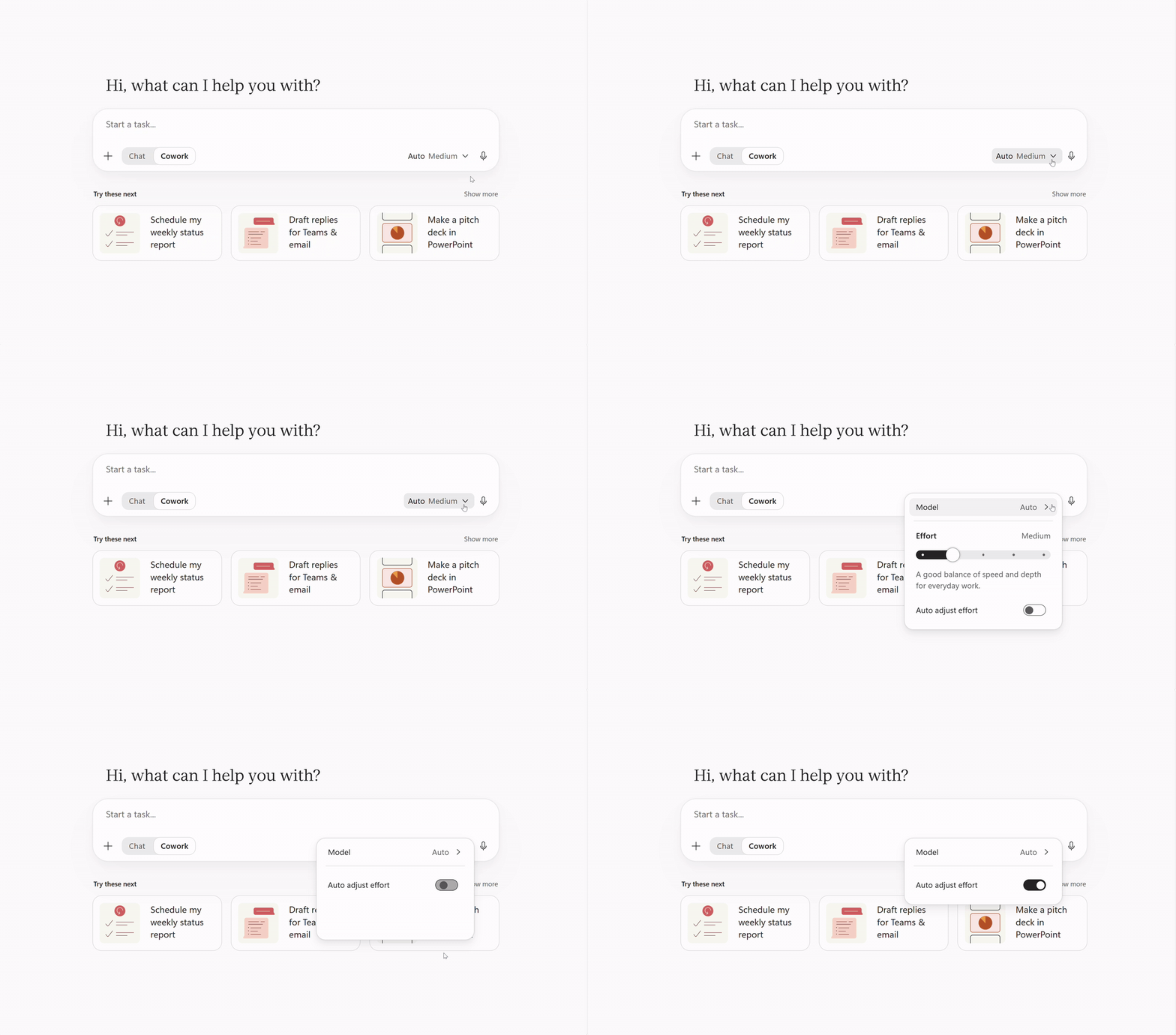
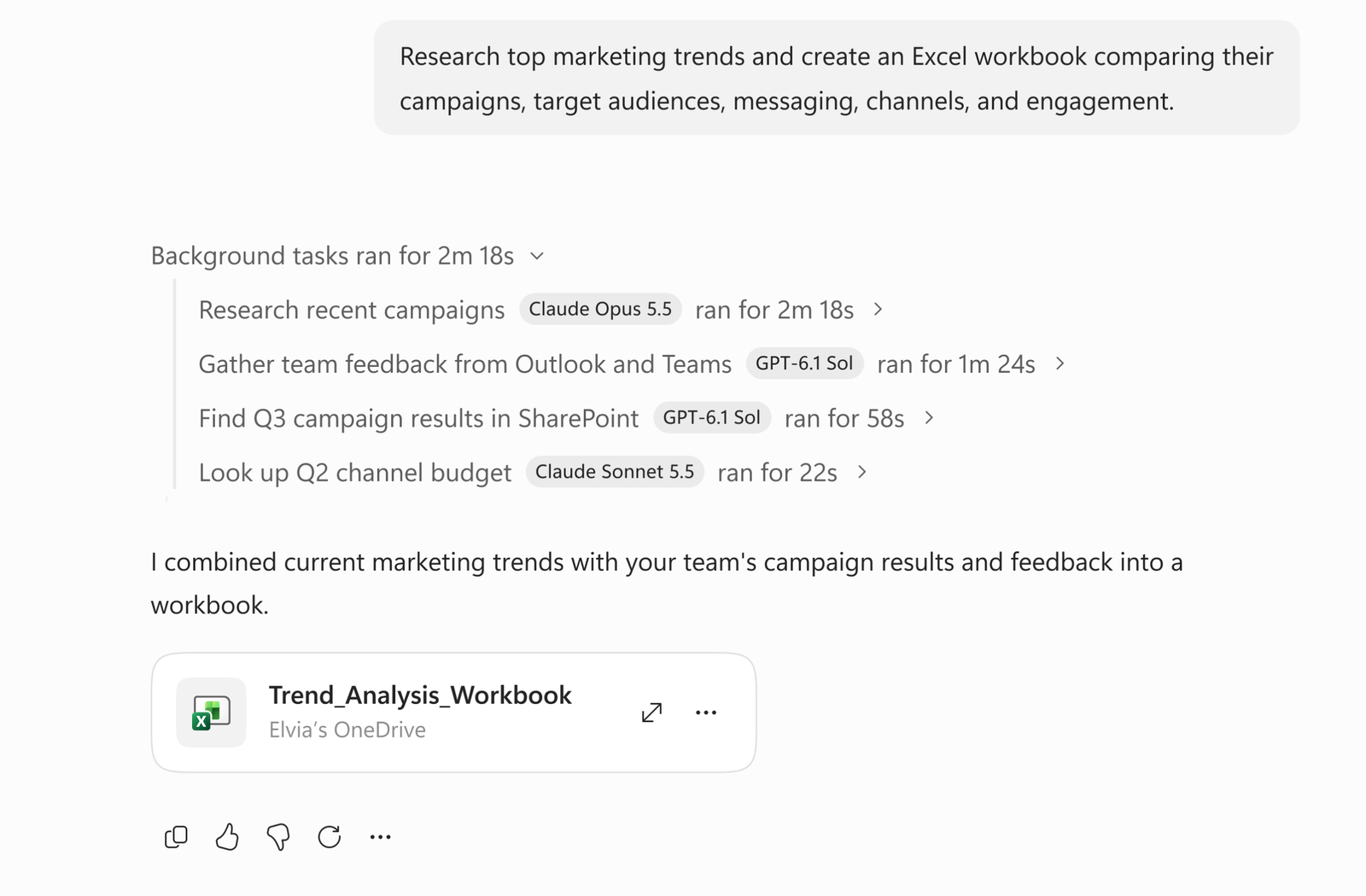
Big task? Auto splits it across subagents. They run side by side, in parallel.
Each subagent uses the best model for its part. The provider does not matter.
Here is Microsoft’s example. One subagent researches competitors with a Claude model. Another builds the financial comparison with a GPT model. You get one single brief back.
New models land in Cowork fast. In the past week alone, Microsoft added GPT 6.2 Sol and Claude Fable 5.2. Fast mode also arrived for Claude Opus and GPT Sol models.
The routing starts even earlier. Open the Copilot app. Home now spots tough work before you start. Then it offers to move that work into Cowork.
Auto is available today in Frontier.
3. What Are Proactive Recommendations?
Your to-do list grows faster than you do. Cowork now works on that problem directly.
It does not wait for a prompt. It reads signals across your email, meetings and Teams chats.
Then it finds work it can take off your plate. And it offers to do it.
Prep for tomorrow’s customer call. A reply to a thread that is waiting on you. That kind of work.
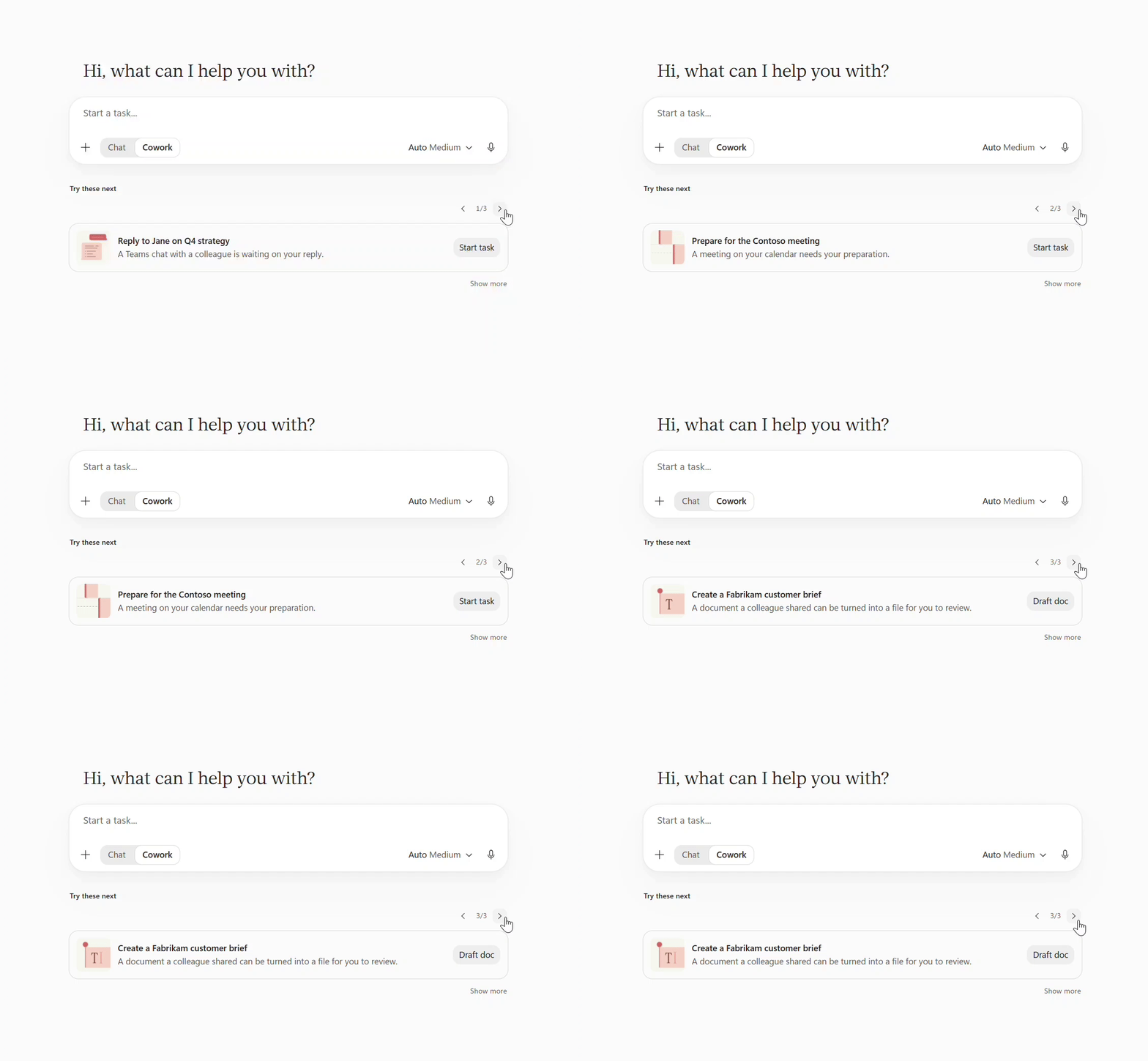
This works because of Work IQ. Work IQ understands your work, your people and your organisation. So the suggestions match your real week. Not a generic list.
The offers appear right below the composer. Pick one. Cowork gets started.
Proactive recommendations are available today in Frontier.
4. What Is Brand Kit in Cowork?
Cowork builds decks, documents, trackers and dashboards. But first drafts rarely look like your company made them.
Brand Kit fixes that.
Name your brand kit in the prompt. For example: “Create the Q3 review deck using the Contoso brand kit.”
Cowork applies your colours, fonts and brand voice as it builds. The first draft is already on brand. No restyling later.
Brand Kit is generally available. It is rolling out now.
5. Can Copilot Cowork Build Apps?
Yes. And this one is generally available too.
Some work should not be a one-time output. Think of the tracker your team rebuilds every week. Or the dashboard leadership keeps asking for.
Now you can turn that output into an app. Describe what you need. Or convert a task result into an app. Then publish it and share it with your team.
Apps run inside your tenant. They run on the Copilot Managed Runtime.
IT can see every app in the Microsoft 365 admin center. IT can manage them too. That is the difference between innovation and shadow IT.
6. Which Plugins Were Announced at Ignite?
Your work does not live only in Microsoft 365. Your CRM, plans and communities live elsewhere.
Plugins bring those systems into Cowork. Cowork can then work with governed data. It can also take action in your other tools.
Admins stay in control. They decide which plugins and skills your organisation can use. A new plugin catalog makes them easy to find.
Salesforce in Microsoft Copilot is the big one. It is in public preview. It brings 39 prebuilt sales skills into Cowork. Your account, opportunity and pipeline context comes with them. Hand off a meeting brief or a deal review. Get finished work back, grounded in CRM and Microsoft 365 together.
The Sales plugin adds 19 more skills. Account briefs. Pitch decks. Customer business reviews. Proposal responses. Plus insights on deals, pipeline and meetings. These skills work in Cowork and in PowerPoint.
The Planner plugin is generally available. Meeting action items become Planner tasks. Status updates build straight from your plan.
The Viva Engage plugin is generally available too. Catch up on your communities. Or draft an announcement in seconds.
The Workforce Intelligence plugin is in Frontier. It brings Work IQ people data into Cowork. Leaders get headcount, layers and spans at a glance. They can see skills across teams. And they can build dashboards for leadership reviews.
7. What Is Cowork in Edge for Business?
A lot of work lives on the web. Expense portals. Supplier sites. Benefits tools. Internal apps.
Cowork in Edge for Business works in all of them. Start from the Edge side pane or the new tab page.
Cowork completes multistep tasks across websites. It fills forms. It moves between sites. You just review.
The guardrails are strict, and that is good. It only uses sites you already have access to. It hands control back for sign-in and payments. And it asks your approval before any sensitive action.
8. How Do You Measure Cowork’s Value and Cost?
Leaders now ask two questions. What is this work worth? And what does it cost?
Agent 365 answers both.
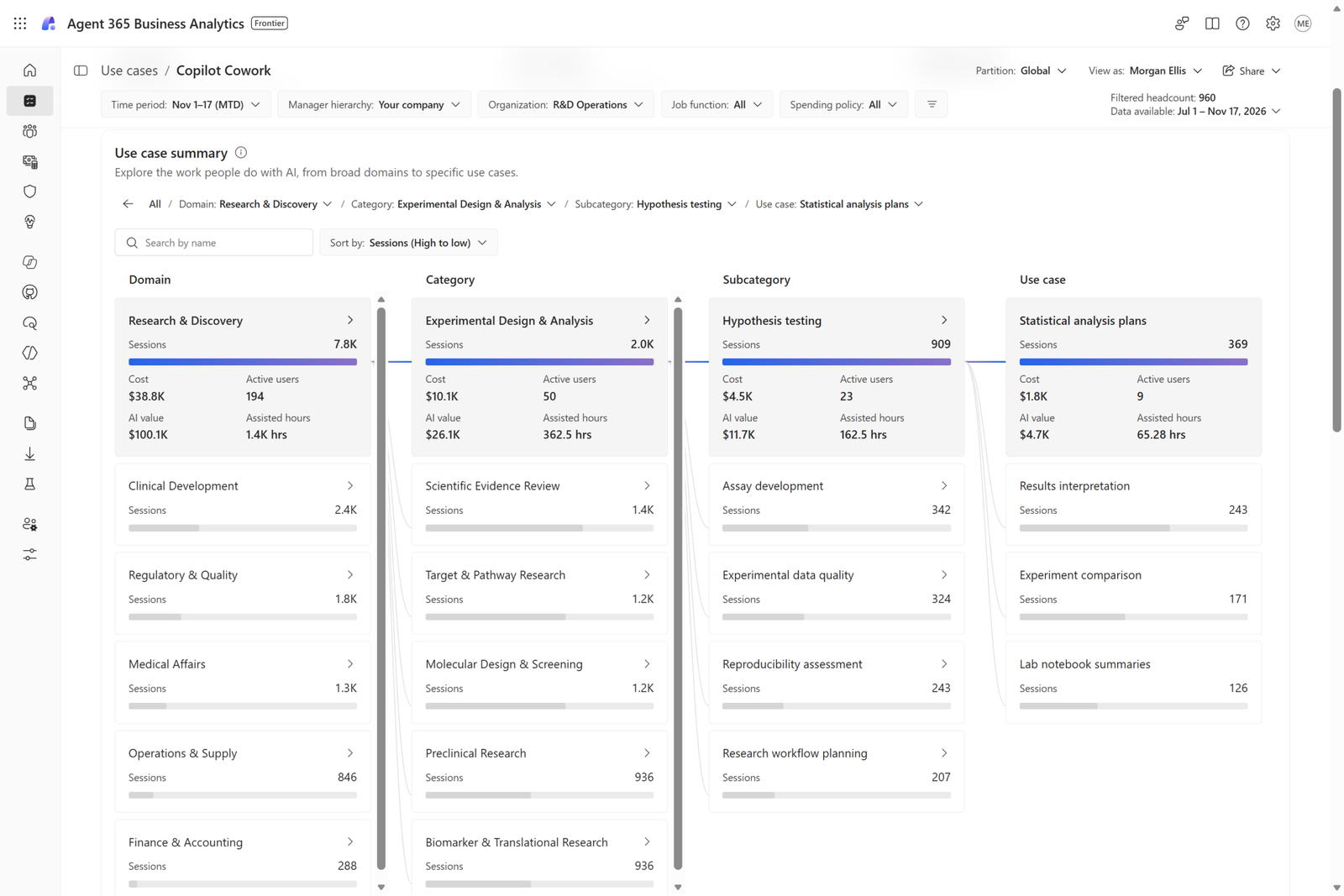
Agent 365 Business Analytics is rolling out today in Frontier. It brings AI spend, usage and value into one view.
For Cowork, it maps tasks to business use cases. Then it estimates the value of completed work.
The metric is called assisted hours. It combines the typical time a task takes with Cowork’s contribution. You see it as an estimated dollar value.
Be careful with this number. Microsoft is clear about it. Assisted hours are a directional estimate. They are not measured time saved. Use them that way in your business case.
Agent 365 Cost Management covers the cost side. It lives in the Microsoft 365 admin center.
IT can see what drives consumption. Users, agents and models, all in one place.
IT can also set spending limits and alerts. At user, group or organisation level. And IT chooses which models teams can use. Spend stays predictable.
This completes the picture from my earlier post. Read Microsoft Agent 365 and Entra Agent ID Explained for the identity and governance side.
9. Availability at a Glance
| Capability | Status |
|---|---|
| Auto mode with subagents | Available today in Frontier |
| Proactive recommendations (Work IQ) | Available today in Frontier |
| Workforce Intelligence plugin | Frontier |
| Agent 365 Business Analytics | Rolling out today in Frontier |
| Brand Kit in Cowork | Generally available, rolling out |
| App building (Copilot Managed Runtime) | Generally available |
| Sales, Planner and Viva Engage plugins | Generally available |
| Cowork in Edge for Business | Generally available |
| Salesforce in Microsoft Copilot (39 skills) | Public preview |
| Copilot Cowork in GCC | Rolling out this month |
One more thing. Cowork is coming to government clouds. The GCC rollout begins this month. Public sector teams stay inside the government cloud boundary. They keep the identity and compliance controls they already trust.
Summary
Ignite 2026 changes what Cowork is. It is no longer just a smart assistant. It is becoming a managed layer for delegated work.
Auto removes model selection. Subagents bring the best model to every part of a task. Proactive recommendations start work before you ask.
Brand Kit makes output usable. App building makes it last. Plugins connect Cowork to the rest of your business.
And Agent 365 wraps it all in value and cost control.
The pattern is clear. Less chatting. More delegating. Governance around everything.
What Should You Do Next?
- Start with Frontier. Auto, recommendations, Workforce Intelligence and Business Analytics are Frontier-first. Give access to a pilot group with real hand-off work. Sellers, finance analysts and HR partners are ideal.
- Pick three use cases. Not thirty. A weekly review deck. A variance memo. A meeting-brief pack. Measure before and after. Keep the claims honest.
- Set cost limits before you scale. Use Agent 365 Cost Management from day one. Set alerts per group. Decide which models each team can use.
- Publish your Brand Kit. Do it once, centrally. Every Cowork deck and document then starts on brand.
- Govern plugins like apps. Start with Planner and Viva Engage. Test Salesforce in preview with your sales ops team.
Official Resources
- What’s new in Copilot Cowork at Ignite 2026 — Microsoft Tech Community
- Session BRK205 at Microsoft Ignite: Beyond Chat: Delegate Complex Work with Copilot Cowork
FAQs
What is Auto mode in Copilot Cowork?
Auto mode picks the right model and reasoning effort for every step of a task. It uses Microsoft-Decision-1.1 to do this. For big tasks, it splits work across parallel subagents. Each subagent uses the best model for its part. The results come back as one deliverable.
Is Copilot Cowork available for government customers?
Yes. Copilot Cowork in GCC begins rolling out this month. It runs inside the government cloud boundary. It uses the identity and compliance controls GCC customers already rely on.
How does Agent 365 Business Analytics measure value?
It maps completed Cowork tasks to business use cases. Then it calculates assisted hours and shows an estimated dollar value. Remember, assisted hours are a directional estimate. They are not measured time saved.
Can Cowork work in Salesforce?
Yes. Salesforce in Microsoft Copilot is in public preview. It includes 39 prebuilt sales skills and your CRM context. Cowork in Edge for Business can also complete tasks across websites you already use.
Who controls plugins and models in Cowork?
Admins do. They choose which plugins and skills are available. With Agent 365 Cost Management, they also set spending limits, alerts and model access.
