



TL;DR: As autonomous AI agents scale, organizations face an urgent governance crisis: “shadow AI.” Microsoft’s answer is a two-part control framework. Microsoft Agent 365 acts as the centralized catalog and registry mapping which agents exist in your tenant, while Microsoft Entra Agent ID provides the underlying non-human identity (NHI) architecture, enforcing human sponsorship, credential lifecycles, and Conditional Access on autonomous agents.
Over the past year, enterprise adoption of custom AI agents has exploded.
Business analysts build agents in Copilot Studio. Developers deploy custom logic in Azure AI Foundry. Citizen makers stitch together multi-step Power Automate cloud flows.
While productivity surges, IT administrators and Chief Information Security Officers (CISOs) are left asking difficult questions:
- Who built that agent querying our customer database at 2 AM?
- Whose credentials is it using?
- What happens to its data access when its creator leaves the company?
Until now, agents relied on generic application registrations, service principals, or shared API keys that offered little visibility and zero human accountability.
Microsoft’s solution is Microsoft Agent 365 and Microsoft Entra Agent ID. Here is exactly how this architecture works, how the two services divide responsibilities, and how IT teams can implement them.
What is the Difference Between Agent 365 and Entra Agent ID?
While closely integrated, the two services address fundamentally different governance needs:
| Layer | Service | Primary Role | The Core Question It Answers |
|---|---|---|---|
| Control Plane & Registry | Microsoft Agent 365 | Centralized catalog, discovery dashboard, and operational registry. | “Which AI agents exist across our entire organization?” |
| Identity & Security | Microsoft Entra Agent ID | Non-human identity (NHI) engine, token issuance, and policy enforcement. | “What identity does this agent run under, who owns it, and under what conditions can it get a token?” |
In short: Agent 365 is your inventory and compliance map. Entra Agent ID is the security badge and permission passport that lets agents execute tasks.
How Does Microsoft Entra Agent ID Work?
What are the new identity constructs?
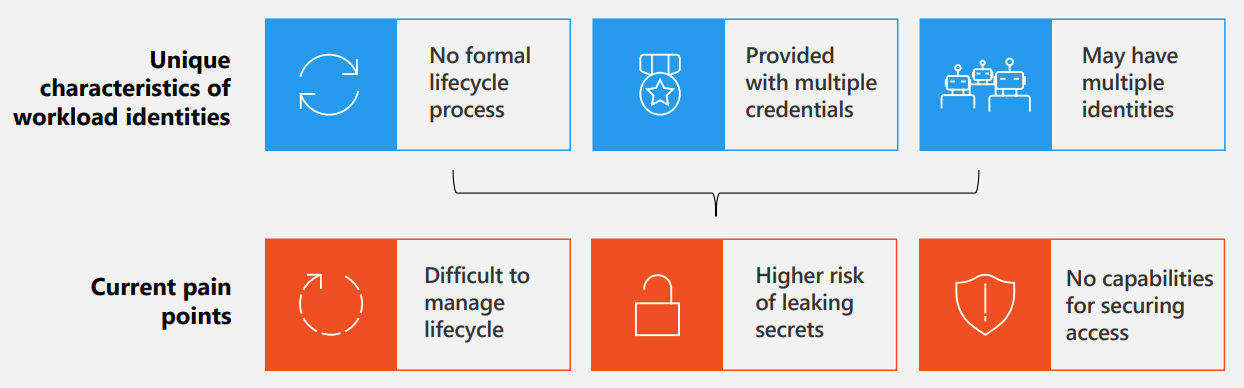
Historically, giving an automation access to enterprise data meant creating an Azure AD App Registration or using interactive user accounts. Neither fit autonomous AI agents well.
Entra Agent ID introduces three purpose-built identity constructs:
- Agent Identity Blueprints: Reusable configuration templates stored in Entra ID. Blueprints define baseline tool permissions, approved model boundaries, and secure credential storage (such as managed identities or certificates).
- Agent Identities: Specialized service principals instantiated directly from an Agent Blueprint. Crucially, the Agent Identity itself holds no long-term static secrets; it requests short-lived tokens evaluated against its blueprint rules.
- Agent Users (Optional): Specialized identities provisioned when an agent specifically requires an interactive Teams presence, dedicated phone number, or Exchange mailbox for collaborative tasks.
1. Mandatory Human Sponsorship and Lifecycle Management
What prevents “orphaned” or rogue agents?
In traditional automation setups, when an employee resigns, their automated scripts often either break immediately (if tied to their user account) or persist forever as unmonitored service principals with excessive permissions.
Under Entra Agent ID:
- Mandatory Sponsorship: Every single agent identity must have at least one designated human owner or corporate sponsor group.
- Automated Lifecycle Reviews: If an owner leaves the organization or shifts departments, Entra ID Governance flags the agent for immediate ownership transfer.
- Expiration Policies: Agents that remain unsponsored for a defined grace period are automatically suspended, preventing stale non-human identities from lurking in your directory.
2. Adaptive Conditional Access for Non-Human Actors
Can you apply Zero Trust to AI agents?
Yes. One of the most impactful capabilities of Entra Agent ID is extending Microsoft Entra Conditional Access directly to agent identities.
Instead of granting an agent permanent, unfettered access to internal APIs, administrators can enforce dynamic policies:
- Location & Network Fencing: Restrict an autonomous data-processing agent to run only from managed corporate Azure virtual networks or specific IP ranges.
- Risk-Based Step-Up: If an agent attempts an unusual volume of database queries or requests sensitive files outside its normal baseline, Entra ID flags the session as high-risk and halts autonomous execution until a human manager approves the task.
- Model Context Protocol (MCP) Firewalls: Inspect and govern external tool calls to ensure agents do not pass proprietary corporate data to unvetted external services.
3. Microsoft Agent 365: The Central Discovery Dashboard
How do administrators track active agents?
While Entra ID manages authentication, Microsoft Agent 365 provides the bird’s-eye management plane across the Microsoft 365 Admin Center.
From the Agent 365 dashboard, administrators gain visibility into:
- Cross-Platform Inventory: Detects agents built in Copilot Studio, Azure AI Foundry, Microsoft 365 Copilot, Security Copilot, and registered third-party frameworks.
- Data Lineage & Connector Mapping: Visualizes exactly which SharePoint sites, SQL databases, and SaaS tools each agent connects to.
- Session & Consumption Analytics: Tracks active user interactions, background task frequency, and Copilot Credit consumption.
- One-Click Revocation: Allows security teams to instantly revoke an agent’s identity token across all connected platforms in the event of a security incident.
Agent Governance: Old Approach vs. Entra Agent ID
| Feature | Legacy Automations / Bots | Entra Agent ID + Agent 365 |
|---|---|---|
| Identity Type | Generic App Registration or Service Account | Dedicated First-Class Agent Identity |
| Accountability | Often anonymous or unmapped | Mandatory human owner / sponsor group |
| Access Control | Static API scopes and client secrets | Token issuance evaluated against Conditional Access |
| Orphan Protection | High risk of abandoned service principals | Automated re-certification and lifecycle termination |
| Visibility | Dispersed across Azure AD and Power Apps | Centralized catalog in Microsoft Agent 365 |
What Should IT Administrators Do Next?
To prepare your tenant for the Agent 365 and Entra Agent ID preview:
- Conduct an automation audit: Review existing Power Platform environments and Azure app registrations to identify bots running under legacy service accounts or individual user credentials.
- Establish identity blueprint standards: Determine what baseline permissions should be approved for internal citizen-built agents versus mission-critical production agents.
- Define sponsorship policies: Formulate organizational guidelines specifying who can serve as an agent sponsor (e.g., department managers, technical leads) and establish notification workflows for when sponsors change roles.
Related Microsoft 365 & Copilot Architecture Guides
- agentic AI governance and security – In-depth architectural analysis and deployment patterns.
- Microsoft Security Copilot evaluation – In-depth architectural analysis and deployment patterns.
- how Microsoft Copilot works under the hood – In-depth architectural analysis and deployment patterns.
Official Microsoft Documentation & Administrative Resources
- Microsoft Entra Identity Governance – Official Microsoft documentation and service administration.
- Microsoft Entra Admin Center – Official Microsoft documentation and service administration.
- Microsoft Purview Compliance Portal – Official Microsoft documentation and service administration.
Frequently Asked Questions
Are existing Copilot Studio bots automatically converted to Entra Agent IDs?
Microsoft is providing an automated onboarding workflow within the Copilot Studio maker portal. When public preview opens, administrators can initiate an upgrade path that provisions Entra Agent Identities for existing declarative bots with zero downtime.
Does Entra Agent ID require a separate license?
Entra Agent ID core capabilities are included with Microsoft Entra ID P1 and P2 plans. Advanced governance features (like automated access packages and periodic re-certification campaigns) leverage Microsoft Entra ID Governance licensing.
Can an agent have more than one human sponsor?
Yes. Microsoft strongly recommends assigning both an individual primary owner and a security group (such as a departmental team or CoE lead group) as co-sponsors to prevent orphaned states.
How does Entra Agent ID handle multi-tenant or external agents?
External agents built by SaaS partners can be registered via cross-tenant synchronization and verified partner blueprints, ensuring guest agents comply with the host tenant’s Conditional Access rules.
Where can administrators access Microsoft Agent 365?
During the rollout, Agent 365 is accessible via the Microsoft 365 Admin Center under the Agents navigation node, with deep links directly into the Microsoft Entra admin center for identity management.
