



To be honest—most of us spend a lot of time double-checking our AI tools. We ask a smart assistant to do a big job, but it misses the details. We end up fixing the mistakes ourselves. It takes time and energy. That is where Microsoft Copilot is stepping up.
Microsoft is giving you more choices for your daily work. Anthropic’s latest AI model, Claude Opus 4.7, is now available inside Microsoft 365 Copilot.
We all want to save time and reduce stress. Adding this new brain to Copilot does exactly that. It helps you tackle hard tasks without the usual headaches. You stay focused on bigger things—like decision-making, innovation, or simply breathing easier during your day.
What is Claude Opus 4.7?
Claude Opus 4.7 is the newest AI model from Anthropic. Think of it as a highly skilled senior teammate. It does not just rush through a job. It stops and thinks.
It is designed to be faster and far more precise than older versions. It knows exactly which tool to pick for the task at hand.
Complex work usually needs close supervision. Not anymore. This model handles long, multi-step projects with incredible rigour. It stays on track from start to finish. You can hand off your hardest work with total confidence.
Key Capabilities of Claude Opus 4.7 in Copilot
This update brings some major upgrades to your workflow. Here is what you can expect when you turn it on.
Closer Instruction Following
You give an instruction, and it listens. It follows your rules closely. It pays precise attention to every detail you provide.
It even checks its own work before it replies to you. Like a good assistant, it reviews the draft before handing it over. This means fewer mistakes for you to fix later.
Advanced Image Understanding
This model has excellent vision. It reads images at a much higher resolution.
It can see pictures up to 2,576 pixels on the long edge. That means it spots tiny details in charts, graphs, or slides. It interprets visual content beautifully. It produces higher-quality interfaces and documents based on what it sees.
Work IQ Integration
It understands the context of your business. It pulls in the right background information using Work IQ.
It then takes action based on that specific context. You get answers that actually fit your company’s data. It remembers important notes across long work sessions. It uses those notes to move on to new tasks easily.
Where Is It Available?
You can start using this new model right away. It is available in a few specific places.
- In Copilot Cowork, it is ready for you now.
- In Copilot Studio, you can access it in early release cycle environments.
- In Copilot in Excel, it is currently rolling out to users.
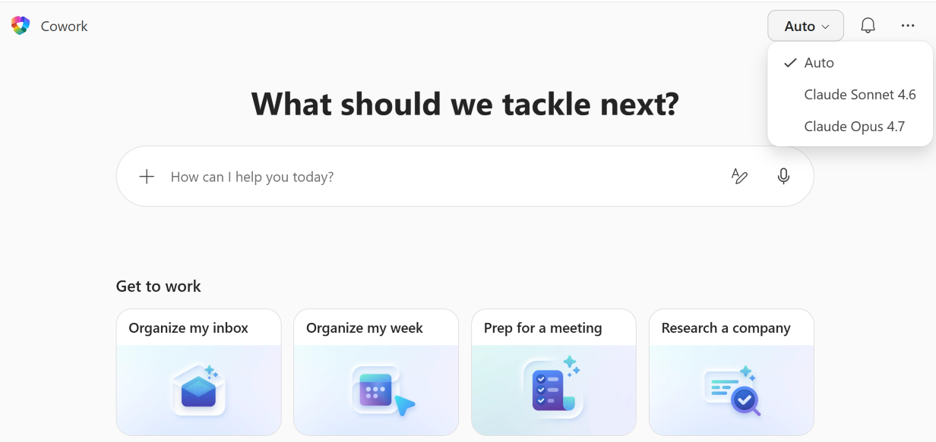
You just need to pick it manually. Open the model selector and choose it.
Microsoft’s Commitment to You
Microsoft wants to give you the best tools for work. They are bringing you the latest AI innovations. Giving you a choice of models is a big part of that plan.
This model is built for business. It is tailored to what you actually need to get done.
It comes with Microsoft’s strong security, compliance, and privacy standards. Your data stays completely safe.
Microsoft will also keep making it better. They update the experience based on your direct feedback.
How to Get Started
Ready to try it? The setup is incredibly simple.
- Open the model selector in Copilot Cowork, Copilot Studio, or Excel.
- Select Claude Opus 4.7 from the drop-down list.
- Start using it for your hardest, multi-step tasks.
If you are still handling every task manually, it is time to level up. This is the future of work—and it’s already here.
Frequently Asked Questions
Q1. What is Claude Opus 4.7?
Anthropic’s newest AI model, now fully integrated into Microsoft 365 Copilot.
Q2. Where is it available?
You can find it in Copilot Cowork, Copilot Studio, and rolling out to Copilot in Excel.
Q3. Do users need to enable it?
Yes. You select it manually via the model selector. It does not turn on by default.
Q4. What makes it different?
It is faster, highly precise, reads images better, and follows instructions closely. It checks its own outputs.
Q5. Is it available across all Microsoft 365 apps?
Not yet. It is currently limited to specific Copilot surfaces.
A Smarter Way to Work
Claude Opus 4.7 brings speed, precision, and visual intelligence directly to your desk. It handles the heavy lifting so you do not have to.
It is a major step forward for Microsoft’s strategy to give you more choices. Users on supported platforms can start exploring it today. Just open the model selector and get to work.
It is not about replacing people. It is about supporting them. Helping you do more with less stress.
